Document Automation
Product features
By practice area
By company size
Contract Review
PRODUCT FEATURES
Resources
LearN
Case Studies
Pricing
CobbleStone Contract Insight runs the whole contract lifecycle for legal, procurement and sales. Gavel Exec helps lawyers review and redline in Word. Here’s which fits your team.

Choose CobbleStone Contract Insight if your organization wants one system for every contract across legal, procurement and sales, from intake and approvals to e-signature, obligations and renewals, including an on-premise option and public-sector credentials such as FedRAMP Ready status and a GSA listing. Choose Gavel Exec if your lawyers need AI review and redlining in Word now, without a CLM project: it starts with 25 free queries and no credit card, then costs $160 per user per month.
CobbleStone Contract Insight is the CLM product of CobbleStone Software; its AI is called VISDOM, with generative features in the VISDOM+ add-on. This comparison covers Contract Insight 26.1.0 (September 2026), the CobbleStone Add-In for Word and the VISDOM AI Helper for Microsoft Word.
CobbleStone Contract Insight
CobbleStone Contract Insight manages contracts from request to renewal for legal, procurement and sales: intake, templates and clause libraries, approval workflows, e-signature, a searchable repository, obligation and renewal alerts, plus vendor management, e-procurement and PO modules. CobbleStone Software has sold contract management software since 1995. It is a full CLM, not just an AI review tool.
Gavel Exec
Gavel Exec is AI contract review, redlining, and drafting software for legal teams. It works in Microsoft Word and online, so attorneys can review contracts inside Word or use browser-based workflows for broader contract analysis.
Gavel Exec supports playbook-based review, redlining, drafting, benchmarking, batch analysis, and multi-document comparison. Playbooks can be generated with AI, built from uploaded files, created manually, or started from built-in playbooks created by practicing attorneys. Gavel Exec publishes pricing at $160 per user per month or $1,740 per user annually, and offers 25 free queries per user with no credit card required.
Start by checking what you already license. VISDOM may already cover your review work, particularly if you have the VISDOM+ add-on and your clause library is built out. Add Gavel Exec seats for lawyers who negotiate counterparty paper in Word and want whole-document redlines, built-in playbooks or market benchmarking. Signed contracts, approvals, signatures and obligations stay in CobbleStone. Gavel Exec works on the document open in Word, so the redlined draft goes back into Contract Insight like any other Word file. Neither vendor documents running both add-ins side by side, so test them in your Word setup. If VISDOM already meets your needs, another seat may add little.
CobbleStone Contract Insight is a contract lifecycle management (CLM) platform from CobbleStone Software with a contract repository, intake, approval workflows, IntelliSign e-signature, obligation tracking and procurement modules. It runs as SaaS or on your own servers, and its VISDOM AI reviews contracts against your playbook, auto-redlines clauses from your clause library and works in Word through CobbleStone’s add-in. Prices are quote-based, with a free 30-day trial. Gavel Exec is AI contract review, redlining and drafting in Word on Windows, Mac and the web, plus a browser app. It starts with 25 free queries and no credit card, then costs $160 per user per month.
Choose Gavel Exec if your lawyers negotiate contracts in Word and want AI redlines against built-in or their own playbooks, plus market benchmarking, this week and at a published per-seat price, whether or not the organization runs a CLM. It suits transactional lawyers at law firms and in-house teams. Not for you if you need a system that stores signed contracts and routes approvals and signatures: Exec handles the review and redline in Word and fits beside a CLM such as Contract Insight, which keeps those jobs. Gavel hosts customer data on AWS in the US by default, with EU, Canada and Australia hosting available.
US public terms checked November 14, 2026. CobbleStone doesn’t publish prices; it offers a free 30-day trial and quotes by edition, licence type and modules. Gavel Exec publishes its per-seat price, with team pricing for 10 or more seats. Sources: CobbleStone pricing request and Gavel Exec pricing.
| Feature | CobbleStone Contract Insight | Gavel Exec |
|---|---|---|
| Price | Not published; quote-based. Express, WorkGroup and Enterprise editions; named, concurrent and read-only licences; VISDOM+ and other modules are add-ons. | $160/user/month or $1,740/user/year; 1,000 queries per user per month; team pricing for 10+ seats. |
| Billing | Annual SaaS subscription or perpetual on-premise licence with optional annual support. | Month to month, no long-term commitment; or $1,740/user/year billed annually. |
| Free Trial | Free 30-day sandbox trial, no credit card required; includes AI-assisted redlining. | 25 free queries per user; no credit card required. |
| AI Features | VISDOM: playbook enforcement, auto-redline from your clause library, risk and sentiment analysis, data extraction, natural-language search and reporting, clause drafting. | Review, redlining, drafting, playbooks, market benchmarking and browser analysis tools. |
| Playbooks | Enforces the playbook and approved clause library your team defines in CobbleStone. | Built-in playbooks; rules from your checklists, spreadsheet playbooks or signed agreements (.docx/PDF/.csv); editing and sharing. |
| Word Integration | Free CobbleStone Add-In for Word (desktop and online) with VISDOM AI Helper, connected to Contract Insight. Mac not listed. | Word add-in for Windows, Mac (2016+) and the web, plus a browser app at exec.gavel.io. |
| Support | Email and phone help, wiki, CobbleStone University training; support included in the SaaS fee. | Live chat, support calls, help center and onboarding; contact 7 days a week. |
Ratings as listed in G2 and Gartner Peer Insights search results, November 2026 (we could not open the rating pages themselves): CobbleStone Contract Insight 4.8 out of 5 on G2 from about 40 reviews, and 4.7 out of 5 on Gartner Peer Insights from 57 ratings. Reviewers on G2 tend to praise CobbleStone’s implementation support; some say the number of configuration options can be overwhelming without clear goals. Ratings cover the product as reviewers use it, not the 26.1.0 AI features specifically.
Watch Gavel’s 71-second Exec walkthrough: a stock investment agreement redlined against an attached term sheet in Word, then a vendor-agreement playbook run with accepted edits appearing as tracked changes. CobbleStone publishes product videos on its site and YouTube channel and offers demos on request. Vendor demonstrations show how a product works, not how well it compares.
[0:07] A Series A preferred stock investment agreement is open in Microsoft Word with the Gavel Exec add-in.
[0:13] “Redline this document”: negotiation style set to market, negotiating for “the company”, a term sheet attached as context, and the instruction to make the terms match it.
[0:23] Exec checks the documents, context, precedent and market data.
[0:27] High-priority suggestions appear with an explanation and accept / reject controls. One corrects the investment amount to match the term sheet ($250,000 → $500,000).
[0:35] Playbooks: Gavel’s built-in playbooks and the team’s own (NDAs, MSAs, DPAs, contractor and vendor agreements).
[0:39] The Vendor Agreements playbook runs. Each rule passes or fails, and failed rules show a reason and proposed changes.
[0:47] Accepted changes appear in Word as tracked changes in the limitation-of-liability clause.
[0:51] A new rule, “Automatic Renewal Restrictions”, is written in plain language and added to the playbook.
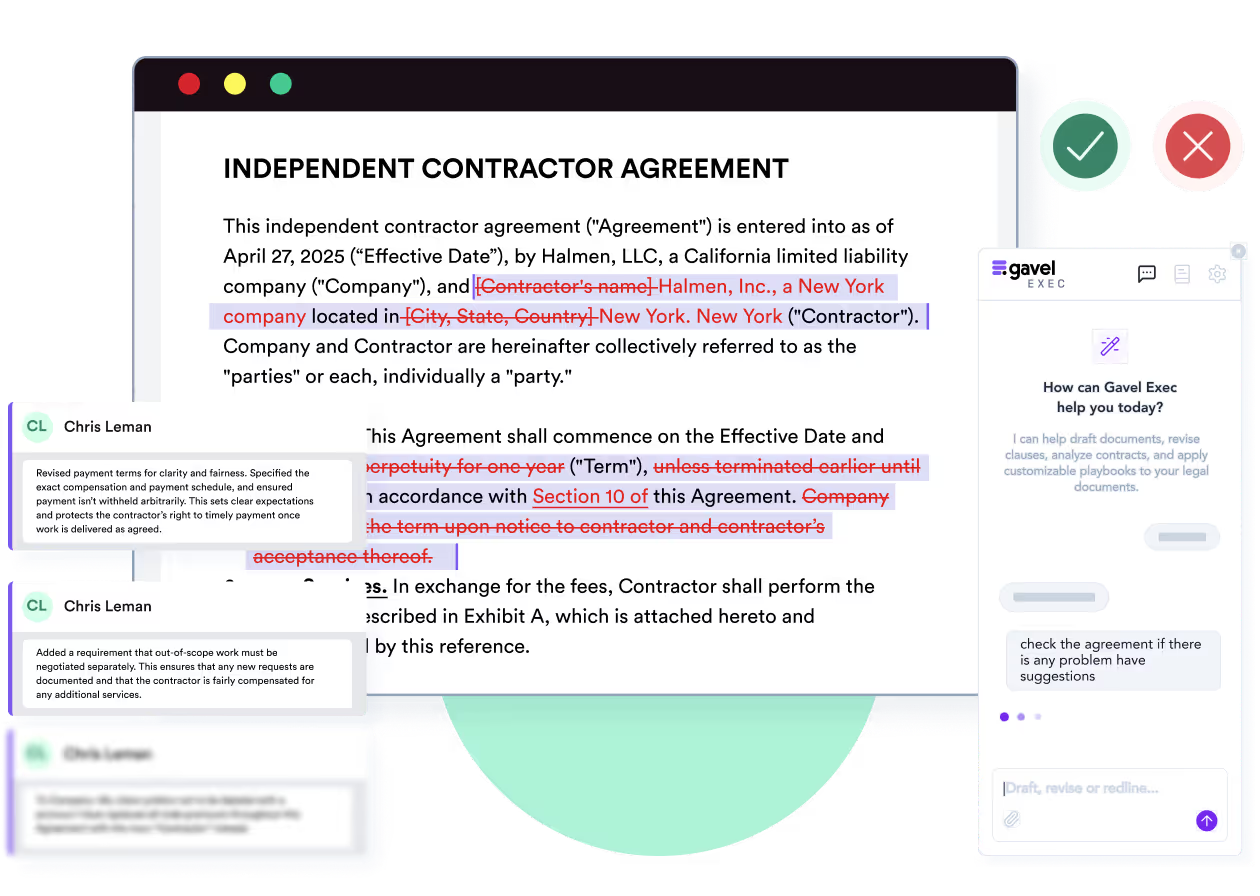
Yes, in different ways. CobbleStone’s VISDOM AI enforces the playbook you define across drafts and revisions, replaces non-compliant language with your approved terms, flags high-risk clauses and reads the negotiating tone of a contract. Its Auto-Redline redlines Word (.docx) files by swapping in clauses from your preferred clause library, either on demand or every time a document is uploaded; you then work on the file in Word or in CobbleStone’s online editor. The VISDOM AI Helper for Microsoft Word, launched in August 2025, adds summaries, risk alerts, playbook reviews and access to your clause library inside Word.
Gavel Exec redlines the whole agreement in Word as priority-ranked tracked changes and comments, based on your precedent and playbooks, with the reasoning behind each change, plus missing-term lists and playbook pass/fail results. You accept or reject each change in Word, as you would a colleague’s markup.
The difference is where the work sits. CobbleStone’s review is one step in a CLM that also covers intake, approvals, signature and obligations, and it works best once your clause library is built. Gavel Exec is built for the negotiation itself, in Word.
You represent the supplier. The customer’s draft makes your liability unlimited for any breach of the agreement; your illustrative playbook caps liability at 12 months of fees, with carve-outs only for confidentiality and indemnity. The expected redline replaces the unlimited-liability sentence with a cap of “the fees paid in the twelve (12) months before the claim” and adds the two carve-outs, with a comment explaining why. You decide whether to accept, edit or reject it, and check that the indemnity and insurance clauses still fit. Done by hand, this is a clause-by-clause read against your checklist. Both vendors document a playbook-based review; this is an evaluation scenario, not a test either product ran.
CobbleStone Contract Insight runs as SaaS hosted by CobbleStone or on your own servers (Windows Server, Microsoft SQL Server, .NET and IIS); the WorkGroup edition is built for on-premise control. CobbleStone says it configures or customizes Contract Insight to your requirements, and that enterprise-wide VISDOM deployment is usually completed within 60 days. Generative AI features sit in VISDOM+, an optional add-on licence built on OpenAI. In Word and Outlook, lawyers use CobbleStone’s free add-ins, which connect to your Contract Insight system and come in desktop and online versions.
Gavel Exec needs an account at exec.gavel.io; the web app works without a download. To redline a specific document, add the Word add-in from Microsoft AppSource. It runs in Word for Windows, Word for Mac (2016 or later), Word on the web and Microsoft 365; if IT manages Microsoft 365 centrally, an admin may need to enable it.
Yes. The free CobbleStone Add-In for Word, with the VISDOM AI Helper, connects Word desktop and Word online to your Contract Insight system for summaries, risk alerts, playbook reviews and clause swaps; CobbleStone doesn’t list Mac support. Gavel Exec runs in Word for Windows, Mac and the web, plus its own browser app, without a CLM.
Gavel Exec costs $160 per user per month, or $1,740 per user per year, after 25 free queries per user with no credit card. Paid plans include 1,000 queries per user per month and run month to month with no long-term contract. Teams of 10 or more seats get team pricing. See Exec plans
CobbleStone Contract Insight’s pricing is not published; it’s quote-based. CobbleStone sells three editions (Express, WorkGroup and Enterprise), mixes named, concurrent and role-based licences, gives unlimited read-only users at no extra cost on Enterprise only, and adds modules such as IntelliSign, VISDOM+ and vendor portals as needed. You choose an annual SaaS subscription or a perpetual on-premise licence with optional annual support. Training, configuration and migration are priced separately, so ask for them in the quote.
CobbleStone Contract Insight’s pricing is not published; it’s quote-based, by edition, licence type and add-on modules, and you request it through CobbleStone’s pricing form. Gavel Exec publishes its per-seat price and starts with 25 free queries per user.
Yes. CobbleStone offers a free 30-day sandbox trial of Contract Insight with no credit card, covering contract authoring, approval workflows, obligation tracking and AI-assisted redlining. Gavel Exec starts with 25 free queries per user and no credit card.
CobbleStone’s attestations page lists SOC 1 Type II and SOC 2 Type II, HIPAA, NIST, FISMA, CSA, the EU-U.S. Data Privacy Framework, TX-RAMP, a VPAT and CMMC 2.0 (self-assessed), and says its Google Cloud environment is FedRAMP and ISO compliant. In January 2026 CobbleStone announced FedRAMP Ready status for Contract Insight and said it is seeking a sponsor for full authorization. VISDOM runs with tenant isolation and encryption at rest and in transit.
Gavel Exec is SOC 2 Type II certified and has Zero Data Retention agreements with the AI model providers it uses, including OpenAI. Customer data is hosted on AWS in the US by default, with EU, Canada and Australia hosting available. Gavel security
Yes. CobbleStone lists SOC 1 Type II and SOC 2 Type II among its attestations, along with FedRAMP Ready status, TX-RAMP and HIPAA. Gavel Exec is SOC 2 Type II certified.
CobbleStone says VISDOM uses an inference-only architecture and your proprietary contracts never train public models. Gavel doesn’t use customer data, prompts or documents to train AI models and has Zero Data Retention agreements with its AI providers.
CobbleStone Software is headquartered in Princeton, New Jersey, and has offered contract management software since 1995. Besides Contract Insight it sells IntelliSign e-signature, vendor management, e-procurement, e-sourcing and PO management software, and serves government agencies, healthcare, education, pharma, energy and financial organizations. It released Contract Insight 26.1.0 in September 2026. Gavel is part of Relativity, which also offers e-discovery software. If your firm wants intake forms that fill client documents, that is Gavel Workflows, Gavel’s document automation product.
CobbleStone Software is founder-led: Mark Nastasi founded it in 1995 and CobbleStone names him as CEO. Its website doesn’t name an outside owner or investor.
Method: Gavel editorial review by Richard Poelderl. Checked against CobbleStone’s and Gavel’s public pages on November 14, 2026. Gavel, part of Relativity since June 12, 2026, publishes this comparison and sells Exec. No hands-on comparative test of the two products was conducted. Corrections: contact Gavel.
It’s the best system I’ve tried, and I’ve tried many. I’ve found Gavel Exec really good to work with and responsive to how I negotiate, how I redline.
Martin Algie, Principal at MIA Contract Lawyers
Pick an agreement you have already negotiated, so you know its issues. Start from a built-in Exec playbook or generate rules from your checklist, run it in Word and compare the redlines with your own markup. If your organization already runs CobbleStone, run the same agreement through VISDOM’s playbook review or Auto-Redline and compare what each flags, what you reject and how long checking takes.
Start with 25 free queries and no credit card. If VISDOM already covers your review work, another seat may add little. If you need to store signed contracts, route approvals and track obligations, that is a CLM’s job, and CobbleStone Contract Insight is built for it.
Run a built-in Exec playbook on an agreement you’re negotiating, with no clause library to set up first, and review each priority-ranked tracked change in Word. 25 free queries per user, no credit card.
This comparison uses publicly available product, pricing, and review information. Features, pricing, and access terms may change, so buyers should verify current details directly with each vendor.
Test Exec’s playbook review on a contract on your desk today. 25 free queries, no credit card.


