Document Automation
Product features
By practice area
By company size
Contract Review
PRODUCT FEATURES
Resources
LearN
Case Studies
Pricing
Gavel Exec features
Gavel Exec is AI contract review and drafting software that runs in Microsoft Word and on the web. It redlines a full agreement for the side you represent, using your positions, your playbooks and the negotiation style you choose. Each suggested edit comes with a priority level and its reasoning, and goes into the document as a Word tracked change.
✓ 25 free queries • No credit card required





Contract redlining software proposes edits to an agreement and shows them as tracked changes. Gavel Exec does this inside Microsoft Word: it reads the whole contract, drafts the changes your side would ask for, ranks them by priority and explains each one. You decide what goes into the document.
Suggestions adapt to each user's redlining style over time, and you can scope a redline to the full agreement or to a clause you select.
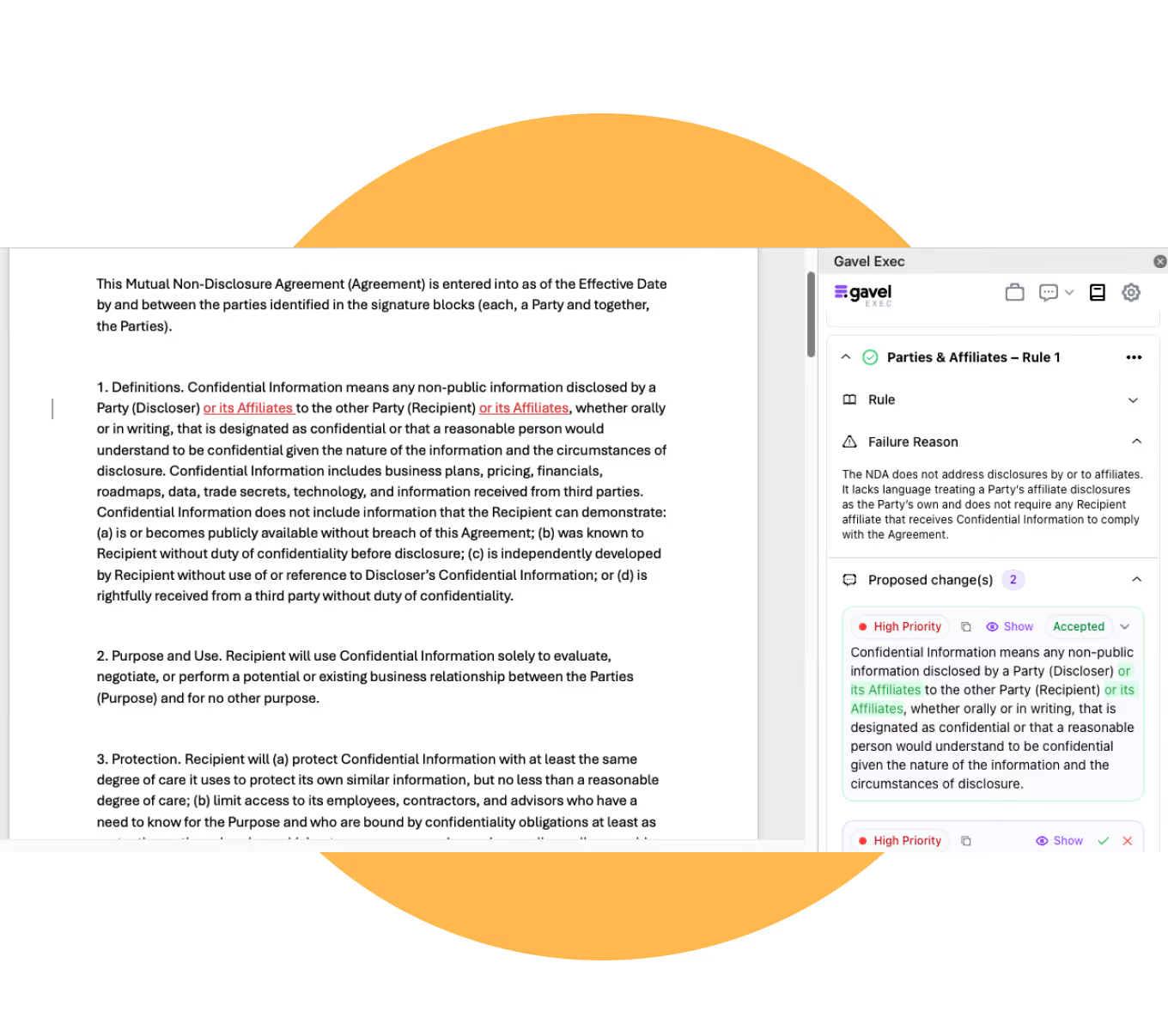
Yes. Run a contract playbook on the agreement with the Use a Playbook Quick Action. Each rule passes or fails, and each failed rule shows the reason and the proposed changes, which you apply as tracked changes. Running the playbook with comments adds negotiation comments written for the counterparty.

Yes. The Add Comments Quick Action lets you choose the comment type: flag negotiation risks for your side, suggest redlines as comments, or explain key points and risks to your client. The comments appear in Word's margin like any other comment.
| Tool | What it does | Writes new contract language? | Where you work |
|---|---|---|---|
| Contract redlining software, such as Gavel Exec | Proposes edits for your side and explains each one | Yes, as suggested tracked changes | Microsoft Word |
| Document comparison | Shows the differences between two versions of a document | No | Word's Compare feature or a separate comparison tool |
| Contract lifecycle management (CLM) | Stores contracts, routes approvals and tracks obligations | Usually only from approved templates | A separate contract platform |
“It’s the best system I’ve tried, and I’ve tried many. I’ve found Gavel Exec really good to work with and responsive to how I negotiate, how I redline.”
Gavel Exec is SOC 2 (System and Organization Controls 2) Type II certified. Gavel has Zero Data Retention agreements with the AI model providers it uses, including OpenAI, and does not use customer data, prompts or documents to train AI models. Details are on the Gavel security page.
Over 2,000 legal organizations in 28 countries use Gavel, which is part of Relativity.
Each user starts with 25 free queries, with no credit card. Paid plans cost $160 per user per month, or $1,740 per user per year, and include 1,000 queries per user per month. Teams of 10 or more seats get discounted pricing. See Gavel Exec pricing, start free or request a demo.
Yes. Gavel Exec writes ordinary Word tracked changes and comments, so the counterparty opens the .docx file in Word and sees a normal markup.
No. Apply All inserts the suggestions as tracked changes, and you accept or reject each one in Word. You can also edit a suggestion before you apply it.
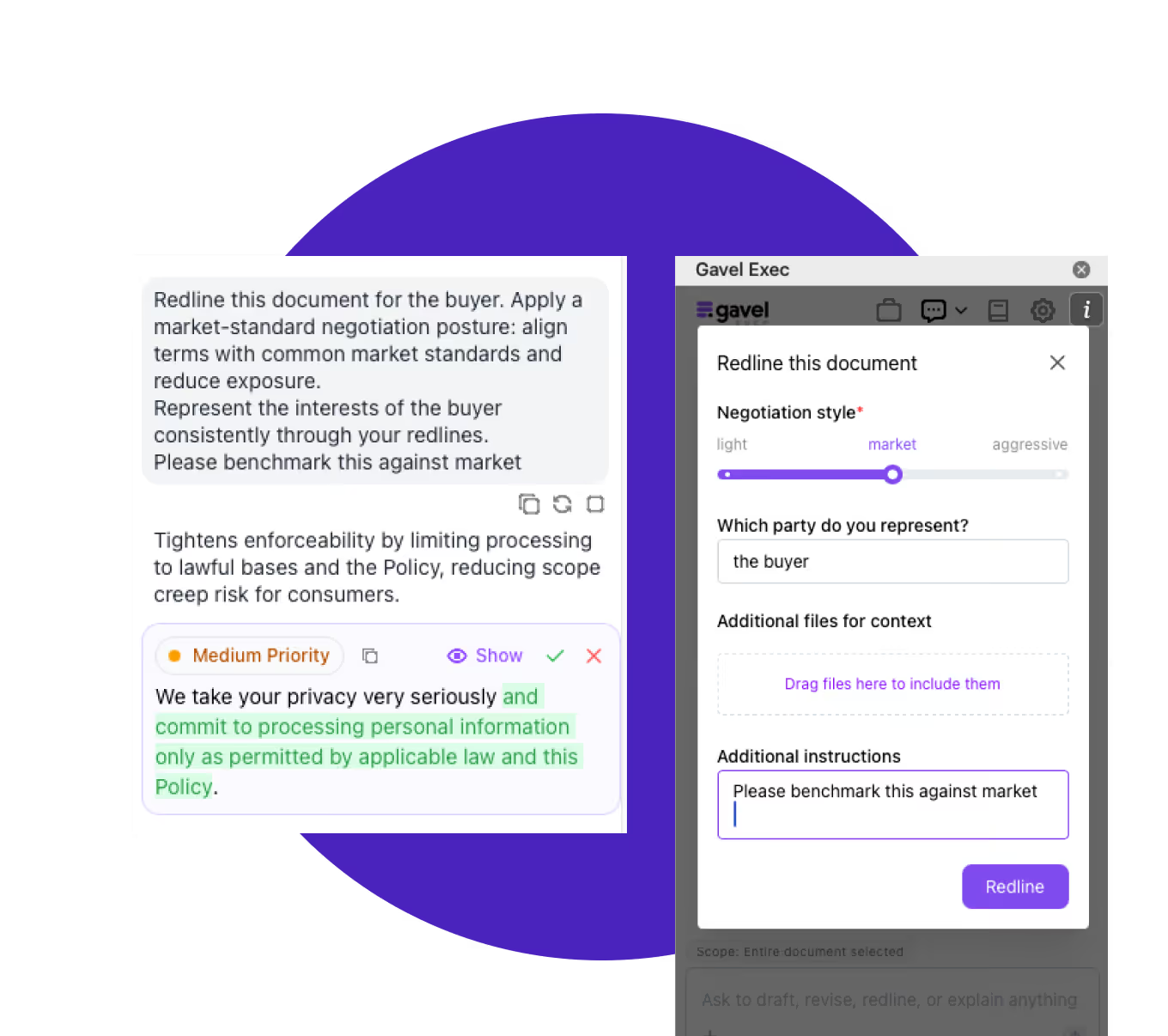
Yes. Tell Redline Document which party you represent and choose a negotiation style, and it proposes changes for your side of the deal.
Yes. The add-in runs in Word for Windows, Word for Mac (2016 or later), Word on the web and Microsoft 365. Redlining a specific document needs the add-in.
No. CLM platforms store contracts and route approvals. Redlining software edits the agreement in front of you. Gavel Exec works in Word alongside whatever system stores your contracts.
Each user gets 25 free queries. Paid plans are $160 per user per month or $1,740 per user per year, with 1,000 queries per user per month.
Last updated October 29, 2026.
✓ 25 free queries • No credit card required