Document Automation
Product features
By practice area
By company size
Contract Review
PRODUCT FEATURES
Resources
LearN
Case Studies
Pricing
Gavel Exec features
Gavel Exec is AI contract review and drafting software that runs in Microsoft Word and on the web. It reads a full agreement, flags non-standard and missing terms, checks the draft against your letter of intent or term sheet, and summarizes risks and the counterparty's changes, with the reasoning behind each flag.
✓ 25 free queries • No credit card required
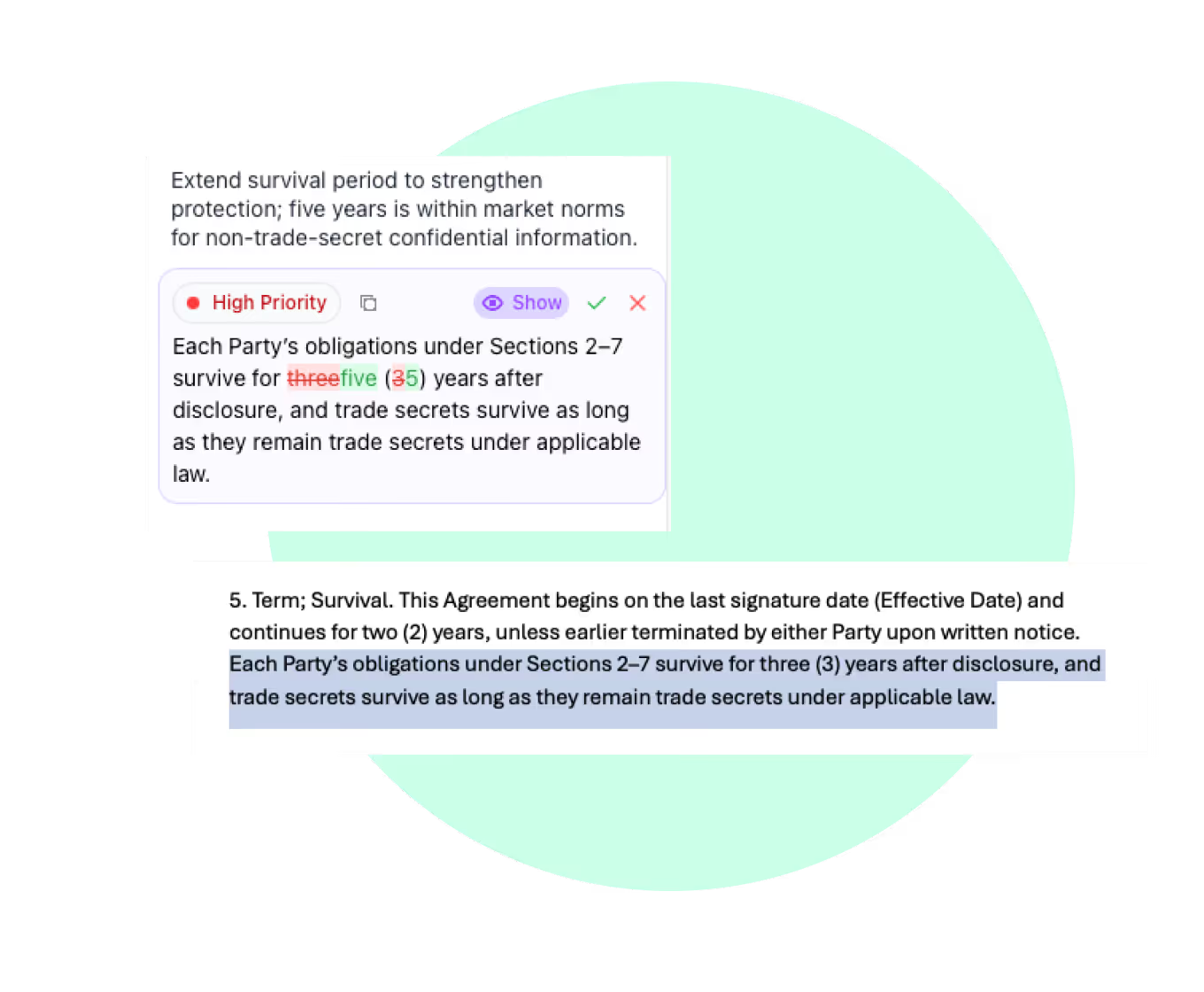





Contract risk analysis is the first pass a lawyer makes through an agreement to find the terms that expose the client: clauses that depart from market practice, protections that are missing, and numbers or definitions that contradict each other or the agreed deal terms. Gavel Exec runs that pass on the open document in Word and explains why each item matters.
Review in Gavel Exec runs through four tools: Chat, Quick Actions such as Find Missing Terms and Summarize Redlines, contract playbooks, and Batch Analysis in the web app. You can point any of them at the whole agreement or at a clause you select.
A review takes five steps in Word. Chat and Projects work the same way in the web app.

Gavel Exec sorts what it finds by type of risk and ranks suggested changes by priority, so the most important issues come first.
| Issue | Example | What you get |
|---|---|---|
| Non-standard terms | A nondisclosure agreement (NDA) whose confidentiality obligations survive for three years | A High Priority suggestion to extend survival to five years, noting that five years is within market norms for confidential information that is not a trade secret |
| Missing terms | An NDA that says nothing about disclosures by or to each party's affiliates | The gap, the reason it matters and proposed language to add |
| Terms that don't match the deal | An acquisition agreement with a $2,300,000 loss threshold when the letter of intent set a $200,000 deductible | A correction to $200,000, tied to the uploaded letter of intent |
| One-sided clauses | An anti-assignment clause that binds both parties when you represent the disclosing party | A suggested change that lets your client assign while the other side stays restricted |
| Counterparty changes | A draft returned with the other side's redlines | A summary of each proposed change from Summarize Redlines |

Yes. Upload the letter of intent (LOI), term sheet or other deal document in Chat, or keep it in the matter's Project, and ask Gavel Exec to confirm that the agreement matches it. It flags numbers, dates and defined terms that differ, such as a loss threshold set higher than the deductible the parties agreed in the LOI.
Files in a Project stay attached to that Project, so every review in the matter uses the same deal documents. Files uploaded to a single chat last for that session.
You choose the baseline for each review:
Source checks can also draw on public filings in the Securities and Exchange Commission's EDGAR database, government sources and the open web. When Gavel Exec relies on an attachment or a Project file, it cites it.
Yes, in the web app. Batch Analysis puts each document in a column and each field you want to compare in a row, such as governing law or term. Auto-detect fields suggests the rows, clicking a cell shows the source language, and you can export the grid as a comma-separated values (CSV) file. Draft Analysis then writes a memo with citations back to each document.
“It’s like having another assistant with you who hears your voice, understands what you want, and gives you whatever you need in seconds.”
Gavel Exec is built for lawyers who review, negotiate and draft contracts in Word: in-house counsel, transactional attorneys, and solo, small and mid-sized firms handling commercial agreements, NDAs, leases and corporate deals. For e-discovery, see Relativity, Gavel's parent company.
Redlines appear in the Gavel Exec panel first, each with its priority and reasoning, and go into the document only when you apply them. Read each flagged clause against the deal and your client's goals before you rely on it. The American Bar Association's Formal Opinion 512 (July 29, 2024) applies the duties of competence, confidentiality and client communication to lawyers' use of generative AI and expects lawyers to review AI output for accuracy.
Gavel Exec is SOC 2 (System and Organization Controls 2) Type II certified. Gavel has Zero Data Retention agreements with the AI model providers it uses, including OpenAI, and does not use customer data, prompts or documents to train AI models. Details are on the Gavel security page.
Over 2,000 legal organizations in 28 countries use Gavel, which is part of Relativity.
Each user starts with 25 free queries, with no credit card. Paid plans cost $160 per user per month, or $1,740 per user per year, and include 1,000 queries per user per month. Teams of 10 or more seats get discounted pricing. See Gavel Exec pricing, start free or request a demo.
Both. Run a review on the whole agreement, or select a clause and scope the chat or Quick Action to the selected text.
Yes. The Find Missing Terms Quick Action compares the agreement with general market norms, industry-specific norms or sample documents you provide, for the jurisdiction you choose, and returns the gaps as a list, as redlines or as comments.
Gavel does not publish an accuracy rate for Gavel Exec, and no AI review should be relied on without a lawyer checking it. Each flag and redline shows its reasoning, and practicing deal attorneys help benchmark the software.
Contracts are reviewed as Word documents. You can attach .docx, .doc and PDF files as context.
Review finds and explains issues. Redlining writes the changes into the agreement as tracked changes, ranked by priority. Many reviews end with a redline.
No. Gavel does not use customer data, prompts or documents to train AI models, and its Zero Data Retention agreements mean its AI providers don't keep your data.
Last updated October 29, 2026.
✓ 25 free queries • No credit card required