Document Automation
Product features
By practice area
By company size
Contract Review
PRODUCT FEATURES
Resources
LearN
Case Studies
Pricing
Contract Cloud keeps review, a contract register and documents in one Australian-hosted workspace. Gavel Exec redlines the contract in Word. Here is which one fits your team.

Contract Cloud and Gavel Exec both use AI to review contracts against your positions and propose amendments in Word, but they start from different places. Contract Cloud is Australian-owned contract management software: AI review, playbooks, a contract register and document storage in one workspace, with customer data hosted in AWS Sydney. Gavel Exec is AI contract review and drafting inside Microsoft Word, with a web app, built for lawyers who negotiate the document themselves.
If you need an Australian-hosted record of every contract, with renewals and SharePoint folders connected, Contract Cloud covers more of the lifecycle. If you need faster, consistent redlines on counterparty paper, Gavel Exec starts free in the Word document you already use.
Contract Cloud
Contract Cloud, from AI Cloud Solutions Pty Ltd in Queensland, is Australian-owned contract management software for in-house legal, law firms, procurement and compliance teams. It combines AI contract review, playbooks, a Word add-in, document Q&A and an AI-generated contract register in one workspace, with customer data at rest in AWS Sydney.
Gavel Exec
Gavel Exec is AI contract review, redlining, and drafting software for legal teams. It works in Microsoft Word and online, so attorneys can review contracts inside Word or use browser-based workflows for broader contract analysis.
Gavel Exec supports playbook-based review, redlining, drafting, benchmarking, batch analysis, and multi-document comparison. Playbooks can be generated with AI, built from uploaded files, created manually, or started from built-in playbooks created by practicing attorneys. Gavel Exec publishes pricing at $160 per user per month or $1,740 per user annually, and offers 25 free queries per user with no credit card required.
Neither vendor documents an integration. Both run as Word add-ins, so a team could keep Contract Cloud as its contract register and use Gavel Exec to redline the Word draft. Ask your Microsoft 365 admin to enable both, and test the round trip on a non-client document first.
Choose Contract Cloud if you want one Australian-hosted workspace for AI review, a contract register, document storage, SharePoint and OneDrive, and renewals, on an annual plan at A$299 + GST per user per month after a free two-week pilot. Choose Gavel Exec if your lawyers negotiate in Word and want playbook redlines as tracked changes, market benchmarking and SOC 2 Type II: 25 free queries, no credit card, then $160 per user per month.
Choose Gavel Exec if your lawyers negotiate in Word on Windows, Mac or the web and want AI redlines against a playbook as tracked changes, with built-in playbooks, market benchmarking and SOC 2 Type II, from $160 per user per month after 25 free queries. Not for you if you want the contract register and renewal tracking in the same tool: Exec works on the draft in Word and its web app, and the signed contract can still go into the register you keep.
Public terms checked November 14, 2026. Contract Cloud prices are in Australian dollars, excluding GST. Sources: Contract Cloud pricing and Gavel Exec pricing.
| Feature | Contract Cloud | Gavel Exec |
|---|---|---|
| Price | A$299 + GST per user per month, billed annually in advance (A$3,588 + GST per named user). SSO is a paid enterprise add-on. | $160/user/month or $1,740/user/year; 1,000 queries per user per month; team pricing for 10+ seats. |
| Billing | Annual plan; renews automatically for 12 months unless you give notice. | Month to month, no long-term commitment; or $1,740/user/year billed annually. |
| Free Trial | Free two-week pilot on your own contracts, set up under an order form; no payment method unless the order form says so. | 25 free queries per user; no credit card required. |
| AI Features | AI review with risk scoring and recommended amendments, document Q&A, bulk queries, AI-generated contract register, approvals and renewals. | Review, redlining, drafting, playbooks, market benchmarking and web analysis tools. |
| Playbooks | Your approved clause positions, fallback wording and escalation rules; built-in playbooks not listed. | Built-in playbooks; rules you write or generate from .docx, PDF or .csv; sharing, import and export. |
| Word Integration | Word add-in included; apply amendments against approved positions. Supported Word versions not published. | Word add-in for Windows, Mac (2016+), Word on the web and Microsoft 365, plus a web app. |
| Support | Australian support 08:00–22:00 AEST, Monday to Friday; free onboarding and training. | Live chat, support calls, help center and onboarding; contact Gavel 7 days a week. |
Ratings, checked November 14, 2026: we found no G2, Capterra, GetApp or Software Advice listing for Contract Cloud (contractcloud.com.au), so we don’t quote a rating for either product here.
Watch Gavel’s 71-second Exec walkthrough: a stock investment agreement is redlined against an attached term sheet, then a vendor-agreement playbook runs and accepted edits appear as tracked changes. Contract Cloud’s Features page has its own product video, which we didn’t review for this page. A vendor demo shows how a product works, not how well it compares.
[0:01] Meet Gavel Exec, the data-driven AI tool for contract redlining and drafting. Built by lawyers right inside Microsoft Word, ask Exec to negotiate your contract to standard market terms or to your preference.
[0:15] Negotiate the agreement and ensure the terms match the attached term sheet. Exec analyzes the contract, any relevant documents from your source database, and drafts suggested language with clear explanations.
[0:31] With Playbooks, lock in your negotiation positions as rules that use your precedent and reliable market benchmarks. Understand gaps with one click and immediately apply changes.
[0:45] Exec draws on thousands of real-world negotiation patterns to give you market-aligned language. And it’s continuously learning from you and your team’s preferences with a collaborative platform.
[0:59] Drive better outcomes with concrete data and reliable issue spotting. Supercharge your contract analysis. Start a free trial of Gavel Exec today.
Proof from an Australian practice: Martin Algie, Principal at MIA Contract Lawyers, negotiates contracts for pharmaceutical distributors in Australia. Gavel reports his first-cut review time fell from about 15 hours to about 5 per contract after he built an in-licensing playbook of about 80 rules.
Contract Cloud is a web workspace first. Contracts are uploaded or connected from SharePoint and OneDrive, reviewed against your playbooks, queried with document Q&A, and kept as a contract record with parties, dates, approvals and renewal terms. Its Microsoft Word add-in brings the review into Word so lawyers can apply amendments against approved positions during mark-up.
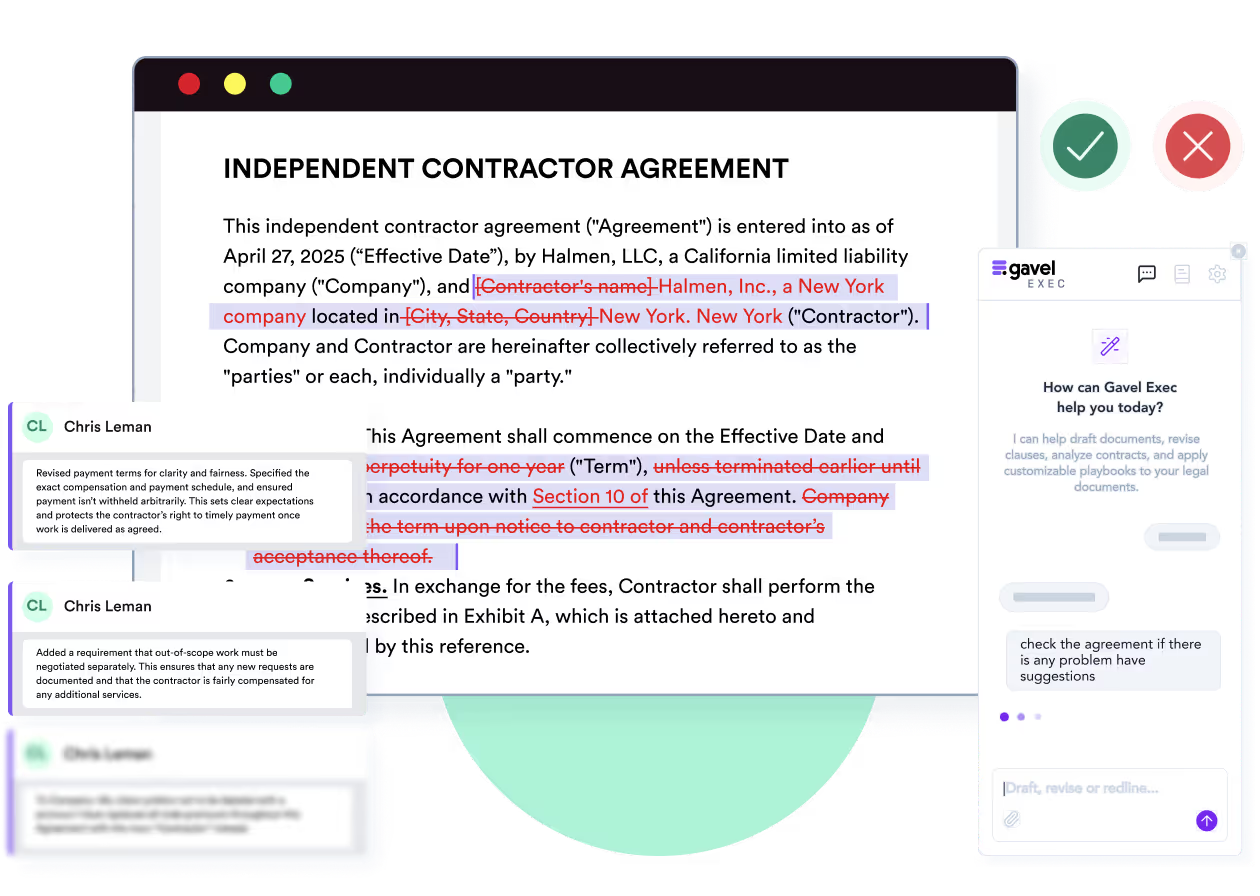
Gavel Exec starts from the document. It is a Word add-in for AI contract review and drafting, so the lawyer stays in the Word file, runs a playbook or a redline request, and gets tracked changes with the reasoning behind each one. A web app at exec.gavel.io handles analysis without a download.
Yes. Contract Cloud’s Word add-in is included in its annual plan and lets reviewers apply amendments against approved positions inside Word. Contract Cloud doesn’t publish which Word versions it supports. Gavel Exec runs in Word for Windows, Mac (2016 or later), Word on the web and Microsoft 365.
Contract Cloud’s AI scores the overall risk of an uploaded contract, flags unusual terms and missing protections, and recommends amendments against playbooks of approved clause positions, fallback wording and escalation rules. Bulk queries ask the same question across a group of contracts, for example which supplier agreements depart from your liability position.
Gavel Exec reviews against a playbook: start from a built-in one, write rules in plain language, or generate rules from your checklists, spreadsheet playbooks or signed agreements. Each rule passes or fails, failed rules come with a reason and proposed redlines, and benchmarking marks each clause on-market, off-market or missing for your jurisdiction, industry and company size. Quick Actions let you pick a country and state, so drafting follows that jurisdiction’s conventions.
You are in-house counsel at a Brisbane company buying software from a US vendor. The vendor’s draft is governed by California law, with disputes heard in San Francisco. Your playbook calls for the law and courts of Queensland, with Singapore arbitration as the fallback. The proposed redline replaces the governing-law and jurisdiction clause and flags the change for your note to the vendor. You decide whether to send it, offer the fallback or escalate. By hand, this is a clause-by-clause read against your checklist. This illustrates the workflow both vendors describe; we didn’t run it in either product.
Contract Cloud is a contract management workspace, not only a review tool. Its annual plan includes an AI-generated contract register (parties, dates, renewal terms, owners), secure document management, client and vendor records, a template and precedent library, approvals and renewal visibility, AI chat over your own documents, and SharePoint and OneDrive connection during onboarding, with free training.
Gavel says Exec isn’t the right tool today if you need a native iManage or NetDocuments integration; it works on the contract open in Word. If you want one place to store, search and track every signed contract, Contract Cloud is built for that job. If you want document generation and intake forms, look at Gavel Workflows instead.
Gavel Exec costs $160 per user per month, or $1,740 per user per year, after 25 free queries per user with no credit card. Paid plans include 1,000 queries per user per month, and you can pay month to month with no 12-month renewal. Team pricing is available for 10 or more seats. See Gavel Exec pricing.
Contract Cloud costs A$299 + GST per user per month, billed annually in advance at A$3,588 + GST per named user. One plan includes AI review, playbooks, the register, the Word add-in and Australian support; SSO is a paid add-on for enterprise customers. The subscription renews automatically for 12 months unless you give notice, and paid usage includes 20 million AI tokens per user per month.
Yes. Contract Cloud offers a free two-week pilot on your own contracts, set up under an order form; its pricing page leads to a demo booking or the team. No payment method is needed unless the order form says otherwise, and data from a pilot that doesn’t convert is deleted with no retrieval. Gavel Exec starts with 25 free queries per user, no credit card.
Contract Cloud’s security page describes AES-256 encryption at rest, TLS 1.3 in transit, role-based access with quarterly reviews, monthly vulnerability scans and SAML single sign-on as a paid add-on. It names the OpenAI API as its language-model provider and says it doesn’t let any provider train models on customer data.
Gavel Exec is SOC 2 Type II certified, encrypts data at rest with AES-256 and has Zero Data Retention agreements with its AI providers, including OpenAI. Support runs 7 days a week; Contract Cloud’s runs 08:00–22:00 AEST, Monday to Friday.
In Australia. Contract Cloud stores all customer data at rest in the AWS Sydney data centre, and its agreement is governed by Queensland law. That is its default, not an option you need to request.
Contract Cloud’s security page doesn’t list SOC 2, ISO 27001 or another third-party certification. It describes an IT risk management framework aligned to ITIL and monthly vulnerability scans. Ask for its security documentation if your procurement requires an audit report.
Yes. Gavel Exec stores data on AWS in the United States by default, and hosting in Australia, the EU and Canada is also available. Ask Gavel which regions apply to your plan before uploading client material.
No. Gavel says it does not use customer data, prompts or document content to train AI models, and its Zero Data Retention agreements mean its AI providers don’t keep your data.
Contract Cloud is a small Australian company led by its two co-founders, an in-house lawyer and a lead engineer. Its site names no customers and we found no review-site listing, so ask for references in your sector before you commit. Other products have similar names, such as Cloud Contracts 365; this page is about contractcloud.com.au. Gavel has been part of Relativity since June 12, 2026, with the same Exec product, team and support.
Contract Cloud is a trading name of AI Cloud Solutions Pty Ltd (ABN 48 679 002 316), an Australian-owned company. Its co-founders are Trent Smith, an in-house lawyer, and Matthew Taulke-Johnson, its lead engineer. It doesn’t publish investors or a founding year.
Method: Gavel editorial review by Richard Poelderl. Checked against Contract Cloud’s and Gavel’s public pages on November 14, 2026. Gavel publishes this comparison and sells Exec; Gavel is part of Relativity. No hands-on test of either product was run for this page. Corrections: contact Gavel.
It’s the best system I’ve tried, and I’ve tried many. I’ve found Gavel Exec really good to work with and responsive to how I negotiate, how I redline.
Martin Algie, Principal at MIA Contract Lawyers (Gavel customer)
Take a counterparty draft you are negotiating now and the positions you apply to it. Open the Word version with Gavel Exec, run a built-in playbook or generate one from your checklist, and review the tracked changes. You decide what goes back to the other side, and the signed contract can still go into your Contract Cloud register.
Start with 25 free queries and no credit card. If Contract Cloud’s review and Word add-in already give you the redlines you need, a second tool may add little. If neither product meets your data-residency or procurement requirements, settle that before uploading client material.
Run an Exec playbook on a counterparty draft and inspect the proposed tracked changes and comments. Start with 25 free queries; no credit card required.
This comparison uses publicly available product, pricing, and review information. Features, pricing, and access terms may change, so buyers should verify current details directly with each vendor.
Test playbook redlines on live counterparty paper. 25 free queries, no credit card.


