Document Automation
Product features
By practice area
By company size
Contract Review
PRODUCT FEATURES
Resources
LearN
Case Studies
Pricing
Contractbook helps European SMBs create, sign, store and track contracts. Gavel Exec helps lawyers review and redline drafts in Word. Here’s which one fits your team.

Choose Contractbook if your business teams need one place to create contracts from templates, collect e-signatures (including MitID and BankID), store signed agreements and get renewal reminders, and you’re a small or mid-sized European company. Choose Gavel Exec if your lawyers negotiate drafts in Microsoft Word, often the other side’s, and want playbook-based redlines as tracked changes: it starts with 25 free queries and no credit card, then costs $160 per user per month.
Contractbook has been part of Scrive, a European e-signature and digital identity provider, since June 2025. This comparison covers Contractbook as sold on contractbook.com on November 14, 2026.
Contractbook
Contractbook is contract management software from Copenhagen, founded in 2017 and part of Scrive since June 2025. Business teams create contracts from templates in its browser editor, negotiate with comments and suggested changes, sign with built-in e-signature and store everything in a repository where AI Import extracts dates and data. Its AI Contract Assistant answers questions about a contract in plain English, summarises terms, flags risks and dates, and recommends clause changes while you draft.
Gavel Exec
Gavel Exec is AI contract review, redlining, and drafting software for legal teams. It works in Microsoft Word and online, so attorneys can review contracts inside Word or use browser-based workflows for broader contract analysis.
Gavel Exec supports playbook-based review, redlining, drafting, benchmarking, batch analysis, and multi-document comparison. Playbooks can be generated with AI, built from uploaded files, created manually, or started from built-in playbooks created by practicing attorneys. Gavel Exec publishes pricing at $160 per user per month or $1,740 per user annually, and offers 25 free queries per user with no credit card required.
Yes, they cover different steps. Negotiate the counterparty’s draft in Word with Gavel Exec, then create a Contractbook draft from the final .docx to send it for signature, store it and set renewal reminders. Neither vendor documents a direct integration between the two.
Contractbook drafts also download as .docx, but its data fields, conditional text, comments and suggestions become plain text in the download, and re-importing doesn’t restore them.
Contractbook (part of Scrive since June 2025) is contract management software for European small and mid-sized businesses: templates with conditional logic, a browser editor, built-in e-signature, a repository with AI data extraction and renewal reminders, and an AI Contract Assistant that answers questions and flags risks. It has a 14-day trial without a credit card; Centralize and Accelerate are quote-based. Gavel Exec is AI contract review, redlining and drafting in Word on Windows, Mac and the web, plus a browser app: 25 free queries, no credit card, then $160 per user per month. In both, a person decides on every change.
Choose Gavel Exec if your lawyers review and negotiate contracts in Word and want redlines against built-in or their own playbooks, plus market benchmarking, starting this week with a self-serve trial. It suits small in-house legal teams and solo, small and mid-sized firms. Gavel Exec is not a contract management system: it covers review and negotiation in Word before signature, so teams that need e-signature, storage and renewal reminders keep Contractbook for those steps and bring it the final .docx.
Public terms checked November 14, 2026. Contractbook bills annually and asks for a quote on Centralize and Accelerate; its company profile says plans start from EUR 89 per month. Gavel Exec publishes its per-seat price, with team pricing for 10 or more seats. Sources: Contractbook pricing and Gavel Exec pricing.
| Feature | Contractbook | Gavel Exec |
|---|---|---|
| Price | From EUR 89/month, per Contractbook’s company profile. Centralize and Accelerate: request a quote. Extra users: 5 for €50/month. | $160/user/month or $1,740/user/year; 1,000 queries per month; team pricing for 10+ seats. |
| Billing | Billed annually (“save up to 25% with annual plans”); minimum term not published. | Month-to-month, no long-term commitment required; annual price is billed annually. |
| Free Trial | 14 days with all features, no credit card; then a limited Free plan. Offered to “limited customers”. | 25 free queries per user; no credit card required. |
| AI Features | AI Contract Assistant (questions, summaries, risks, red flags, dates, clause rewrites); AI Import data extraction; reminders. | Review, priority-ranked redlines, drafting, playbooks, market benchmarking and browser analysis. |
| Playbooks | No review playbooks listed; pre-approved templates, conditional clauses (Accelerate) and editable AI data-field prompts. | Built-in playbooks; rules from .docx, PDF or CSV; manual editing, sharing and import/export. |
| Word Integration | No Word add-in listed. Create drafts and templates from .docx; download as .docx (Contractbook fields become plain text). | Word add-in for Windows, Mac (2016+), Word on the web and Microsoft 365, plus a web app at exec.gavel.io. |
| Support | Live chat, email and phone on all plans; dedicated Success Manager from Centralize. | Live chat, Exec help center and phone support 7 days a week; demo for security and vendor questions. |
Ratings checked November 14, 2026: Contractbook’s website shows a G2 rating of 4.7, from 75 reviews as listed on G2, November 2026. Contractbook’s company profile cites 4.7 out of 5 from 77 reviews on Capterra. These ratings cover Contractbook’s whole platform, including e-signature and storage, not only its AI features.
Watch Gavel’s 71-second Exec walkthrough to see a Series A stock investment agreement redlined against an attached term sheet, then a vendor-agreement playbook run with accepted edits appearing as tracked changes. Contractbook offers personalised demos on request. Vendor demonstrations show how a product operates, not how well it compares.
[0:01] Meet Gavel Exec, the data-driven AI tool for contract redlining and drafting. Built by lawyers right inside Microsoft Word, ask Exec to negotiate your contract to standard market terms or to your preference.
[0:15] Negotiate the agreement and ensure the terms match the attached term sheet. Exec analyzes the contract, any relevant documents from your source database, and drafts suggested language with clear explanations.
[0:31] With Playbooks, lock in your negotiation positions as rules that use your precedent and reliable market benchmarks. Understand gaps with one click and immediately apply changes.
[0:45] Exec draws on thousands of real-world negotiation patterns to give you market-aligned language. And it’s continuously learning from you and your team’s preferences with a collaborative platform.
[0:59] Drive better outcomes with concrete data and reliable issue spotting. Supercharge your contract analysis. Start a free trial of Gavel Exec today.
Contractbook is built around your own paper. You draft from a template in its browser editor, share the draft with permission to comment and suggest changes, and keep version history and an audit trail. Once a contract is out for signature, Contractbook’s help center says a signee can only send a general change request, which pauses signing until the sender edits and resends. Its AI Contract Assistant can spot red flags, rewrite clauses and summarise terms, and gives clause-by-clause recommendations while you draft.
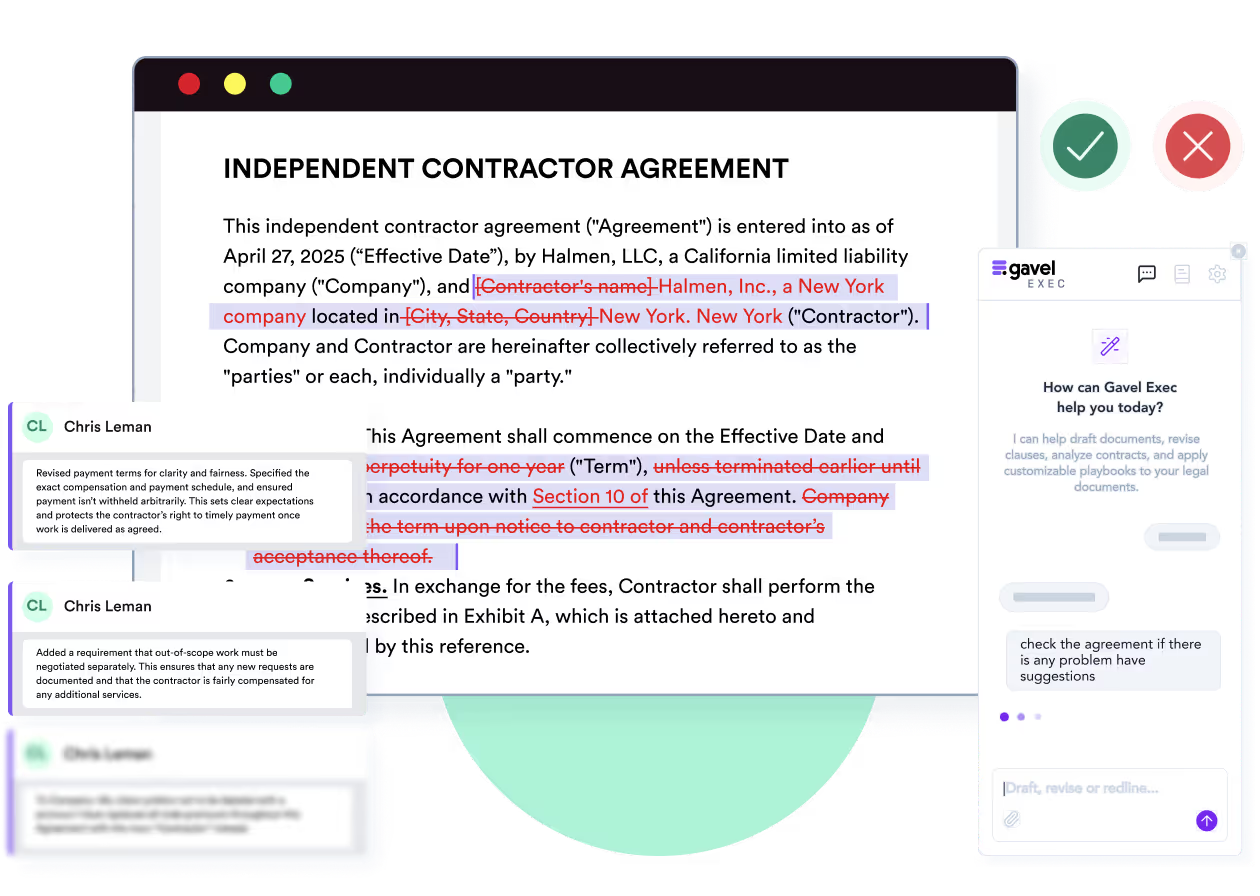
Gavel Exec is built around the draft in front of you, often the other side’s. Open the agreement in Word, run a playbook or a Quick Action, and Exec returns priority-ranked redlines as tracked changes, with comments, a list of missing terms and the reasoning behind each change. You accept or reject each one in Word, as with a colleague’s markup.
Contractbook’s own changelog describes its .docx download as a way to react to “counterparties who insist on negotiating in Word”. If most of your agreements arrive as someone else’s Word file, that is the work Gavel Exec is for.
You’re in-house counsel at a software supplier. The customer’s MSA leaves your liability uncapped. Your illustrative playbook caps it at the fees paid in the twelve months before the claim, with carve-outs only for confidentiality and data-protection breaches. The expected redline adds the cap and the carve-outs as tracked changes, with a comment explaining the position. You decide whether to accept, edit or reject it, and check that the indemnity and insurance clauses still fit. Done by hand, this is a clause-by-clause read against your checklist. Once both sides agree, you can sign and store the final version in Contractbook. This is an evaluation scenario, not a test either product ran.
Contractbook runs in the browser. Recipients don’t need a Contractbook account to sign, and all plans include its e-signature, with MitID and BankID for Scandinavian signers. You can create drafts and templates from .docx files (added February 2025) and download them as .docx (June 2025). User provisioning and sign-in through Okta or Microsoft Azure is an add-on on Centralize and included in Accelerate. Contractbook names the Nordics, the UK, DACH and Benelux as its markets.
Gavel Exec needs an account at exec.gavel.io; the web app works without a download. To redline a specific document, add the Word add-in from Microsoft AppSource. It runs in Word for Windows, Word for Mac (2016 or later), Word on the web and Microsoft 365; if IT manages Microsoft 365 centrally, an admin may need to enable it. You choose a country and state or province for drafting and review; for contracts in another language, Gavel asks you to talk to it first.
Contractbook doesn’t list a Word add-in. You can create a Contractbook draft or template from a .docx file and download drafts as .docx, but Contractbook’s data fields, conditional text, comments and suggestions become plain text in the download. Gavel Exec runs inside Word on Windows, Mac and the web.
Gavel Exec costs $160 per user per month, or $1,740 per user billed annually, with 1,000 queries per user per month, after 25 free queries per user with no credit card. The monthly plan runs month to month, with no long-term contract. Teams of 10 or more seats get team pricing. See Gavel Exec plans.
Contractbook sells plans by team size and volume, billed annually. Essential covers 1 user, 5 templates and up to 100 signed contracts a year, with the AI Contract Assistant. Centralize adds 5 users, AI uploads and data extraction, 15 templates and 350 signed contracts a year. Accelerate adds 10 users, automations, dynamic templates with conditional logic and 500 signed contracts a year. Contractbook’s company profile says plans start from EUR 89 per month; on its pricing page, Centralize and Accelerate are quote-based. Extra users come in packs of 5 for €50 per month, and API, Zapier, Make.com, Salesforce and Forms are add-ons.
Contractbook’s company profile says plans start from EUR 89 per month, billed annually. Centralize and Accelerate are quote-based (“Request a quote”), and each plan sets limits on users, templates and signed contracts per year. Gavel Exec publishes a per-seat price.
Yes. Contractbook offers 14 days with all features and no credit card, then moves you to a limited Free plan; it says the offer is available to limited customers. Gavel Exec starts with 25 free queries per user, also without a credit card.
Contractbook was founded in Copenhagen in 2017 by Niels Martin Brochner, Viktor Heide and Jarek Owczarek, and raised $43.6 million, including a $30 million Series B in 2021. It says more than 10,000 businesses use it. Its published customer quotes come from heads of legal, compliance officers and operations managers.
Scrive, a European e-signature and digital identity provider backed by Vitruvian Partners, acquired Contractbook in June 2025. Contractbook’s website now carries the Scrive ApS name, and the two companies describe one platform from contract creation to signature to long-term management.
Contractbook announced the deal in “Contractbook joins Scrive”.
Contractbook lists SOC 2 Type II, GDPR and eIDAS compliance on its pricing page, uses SHA-256 with RSA encryption for connections, offers two-factor signing and runs regular black-box penetration tests. It is based in Denmark. The Contractbook pages checked don’t name the AI models behind its assistant. Gavel Exec is SOC 2 Type II certified, has Zero Data Retention agreements with its AI providers, including OpenAI, and encrypts data at rest with AES-256 in AWS data centers, hosted in the United States by default with European Union, Canada and Australia options. Gavel security.
Yes. Contractbook lists SOC 2 Type II compliance on its pricing page, along with GDPR and eIDAS, and is based in the EU (Denmark). Gavel Exec is also SOC 2 Type II certified.
No. Gavel does not use customer data, prompts or document content to train AI models, and has Zero Data Retention agreements with its AI providers, including OpenAI.
Law firms that want client questionnaires to generate documents, rather than AI review, should look at Gavel Workflows instead.
Method: Checked against Contractbook’s and Gavel’s public pages on November 14, 2026, by Gavel’s editorial team. Gavel publishes this comparison and sells Gavel Exec; Gavel has been part of Relativity since June 12, 2026. No hands-on test of either product was run. Corrections: contact Gavel.
It’s the best system I’ve tried, and I’ve tried many.
Martin Algie, Principal, MIA Contract Lawyers (quoted on gavel.io/exec)
Pick an agreement you have already negotiated, so you know its issues. Start from a built-in Exec playbook or generate rules from your checklist, run it in Word and compare the redlines with your own markup and the time you spend checking them. If you already use Contractbook, keep signing and storage there: create a Contractbook draft from the final .docx and send it for signature as usual.
Start with 25 free queries and no credit card. If Contractbook’s AI Contract Assistant already covers your review work, another seat may add little. If what you need is e-signature, a contract repository and renewal tracking, that is Contractbook’s job.
Run a built-in playbook or your own rules on a counterparty’s draft in Word, then take the agreed .docx to Contractbook for signature. 25 free queries per user, no credit card, no sales call.
This comparison uses publicly available product, pricing, and review information. Features, pricing, and access terms may change, so buyers should verify current details directly with each vendor.
Test Exec’s playbook review on the contract on your desk, then sign it wherever you sign today. 25 free queries, no credit card.


