Document Automation
Product features
By practice area
By company size
Contract Review
PRODUCT FEATURES
Resources
LearN
Case Studies
Pricing
DocJuris gives an in-house department, with its procurement and sales teams, one AI platform priced by the work. Gavel Exec helps lawyers redline and draft in Word, priced per seat. Here’s which fits your team.

Choose DocJuris if you run an in-house legal department that wants one platform for legal, procurement and sales: playbook redlines on third-party paper, contract intake, vendor screening and repository tracking, with unlimited users on an annual fee sized to the work, set up by DocJuris’s team. Choose Gavel Exec if your lawyers negotiate in Word and want to start this week without a sales process: 25 free queries and no credit card, then $160 per user per month.
DocJuris is made by DocJuris, Inc. in Houston, Texas. Workforce is the name of its app catalog, launched in July 2026, and DocJuris in Word its Word add-in. This comparison covers the DocJuris platform, its Word add-in and its contract review app as published on November 14, 2026.
DocJuris
DocJuris is an AI platform from DocJuris, Inc. in Houston, Texas, founded in 2018 as a contract negotiation tool. Its contract review app returns redlines and a screening report on third-party Word or PDF paper against your playbook, and its Workforce catalog adds more than 25 apps, from vendor screening and intake to repository tracking and eBilling. It works in the browser, by email and in Word, and is built for in-house legal, procurement and sales teams.
Gavel Exec
Gavel Exec is AI contract review, redlining, and drafting software for legal teams. It works in Microsoft Word and online, so attorneys can review contracts inside Word or use browser-based workflows for broader contract analysis.
Gavel Exec supports playbook-based review, redlining, drafting, benchmarking, batch analysis, and multi-document comparison. Playbooks can be generated with AI, built from uploaded files, created manually, or started from built-in playbooks created by practicing attorneys. Gavel Exec publishes pricing at $160 per user per month or $1,740 per user annually, and offers 25 free queries per user with no credit card required.
DocJuris’s platform fee already covers unlimited users, so start with what’s missing. Add Gavel Exec seats for the lawyers who want market benchmarking or who build and adjust their own playbook rules while they negotiate in Word. Keep intake, procurement screening, repository tracking and the business-user workflows in DocJuris. A playbook you keep as a checklist, spreadsheet or signed precedent can seed Exec rules; review them before you run them. Neither vendor documents running both Word add-ins together, so test them in your Word setup.
DocJuris is an AI platform from DocJuris, Inc. (Houston, Texas) for in-house legal, procurement and sales teams: it redlines third-party contracts against your playbook, runs a catalog of more than 25 workflow apps and works in Word for Microsoft 365 on Windows and Mac and Word on the web. It isn’t priced per seat; it quotes an annual platform fee with unlimited users, or a build fee plus usage credits, after a demo. Gavel Exec is AI contract review, redlining and drafting in Word on Windows, Mac and the web, plus a browser app. It starts with 25 free queries and no credit card, then costs $160 per user per month. In both, a lawyer approves every change.
Choose Gavel Exec if your lawyers negotiate and draft in Word, on Windows, Mac or the web, and want AI redlines against built-in or their own playbooks, plus market benchmarking, starting today at a published per-seat price. It suits solo, small and mid-sized firms and small in-house teams. Omar Nakadi, Legal Counsel at a regulated financial services firm, estimates 40 to 60% less review time per contract with Exec. Not for you if you need a native document management integration such as iManage or NetDocuments today, or one tool for procurement and sales staff as well as lawyers: Exec is built for negotiating and drafting contracts in Word.
Public terms checked November 14, 2026. DocJuris quotes a fee sized to your contract volume, apps and integrations, never to headcount; Gavel Exec prices per seat in US dollars, with team pricing for 10 or more seats. Sources: DocJuris pricing and Gavel Exec pricing.
| Feature | DocJuris | Gavel Exec |
|---|---|---|
| Price | Not published; quote-based. Annual platform fee sized to contract volume, apps and integrations, with unlimited users; or a one-time build fee plus hosting and AI usage credits. | $160/user/month or $1,740/user/year; 1,000 queries per user per month; team pricing for 10+ seats. |
| Billing | Annual platform subscription, or one-time build fee with usage credits; minimum term not published. | Month-to-month, no long-term commitment required; annual price is billed annually. |
| Free Trial | No platform trial published; demo and custom proposal. Free Contract Email Agent (no signup) and free Horizon legal news brief. | 25 free queries per user; no credit card required. |
| AI Features | Redlines and screening report on third-party paper (risk, favorability heatmap, negotiation paths); Ask and Edit in Word; 25+ Workforce apps. | Review, priority-ranked redlines, drafting, playbooks, market benchmarking and browser analysis. |
| Playbooks | Quick pass with no playbook, a one-time playbook file or a saved playbook; playbooks configured by DocJuris’s team at onboarding. | Built-in playbooks; rules from .docx, PDF or CSV; manual editing, sharing and import/export. |
| Word Integration | DocJuris in Word: Word for Microsoft 365 on Windows and Mac and Word on the web, deployed by IT; also browser platform and email agent. | Word add-in for Windows, Mac (2016+), Word on the web and Microsoft 365, plus a web app at exec.gavel.io. |
| Support | Concierge onboarding with security review and integration setup; support terms not published. | Live chat, support calls, help center and Exec onboarding; demo for security and vendor questions. |
Few public ratings exist for DocJuris. As listed on G2, November 2026, it holds 4.5 out of 5 from 2 reviews; as listed on Capterra, November 2026, 4.8 out of 5 from 6 reviews. Samples this small are no basis for a decision; ask DocJuris for references from a legal team of your size.
We didn’t find a public DocJuris product walkthrough video on the pages we checked; it offers demos on request, and its free Contract Email Agent lets you see a redline on a contract of your own. Watch Gavel’s 71-second Exec walkthrough to see a Series A stock investment agreement redlined against an attached term sheet, then a vendor-agreement playbook run with accepted edits appearing as tracked changes. Vendor demonstrations show how a product operates, not how well it compares.
[0:01] Meet Gavel Exec, the data-driven AI tool for contract redlining and drafting. Built by lawyers right inside Microsoft Word, ask Exec to negotiate your contract to standard market terms or to your preference.
[0:15] Negotiate the agreement and ensure the terms match the attached term sheet. Exec analyzes the contract, any relevant documents from your source database, and drafts suggested language with clear explanations.
[0:31] With Playbooks, lock in your negotiation positions as rules that use your precedent and reliable market benchmarks. Understand gaps with one click and immediately apply changes.
[0:45] Exec draws on thousands of real-world negotiation patterns to give you market-aligned language. And it’s continuously learning from you and your team’s preferences with a collaborative platform.
[0:59] Drive better outcomes with concrete data and reliable issue spotting. Supercharge your contract analysis. Start a free trial of Gavel Exec today.
DocJuris reviews third-party paper in Word or PDF, including locked files, and returns a redlined .docx plus a screening report with an executive summary, key terms, per-party risk, a favorability heatmap and negotiation paths. You can run a quick pass with no playbook, attach a one-time playbook file or use a saved one, and its Guided Review lets you confirm each position before the redline is written. Contracts can also arrive by email, from SharePoint or from intake forms, so procurement and sales staff can send them in without opening a legal tool.
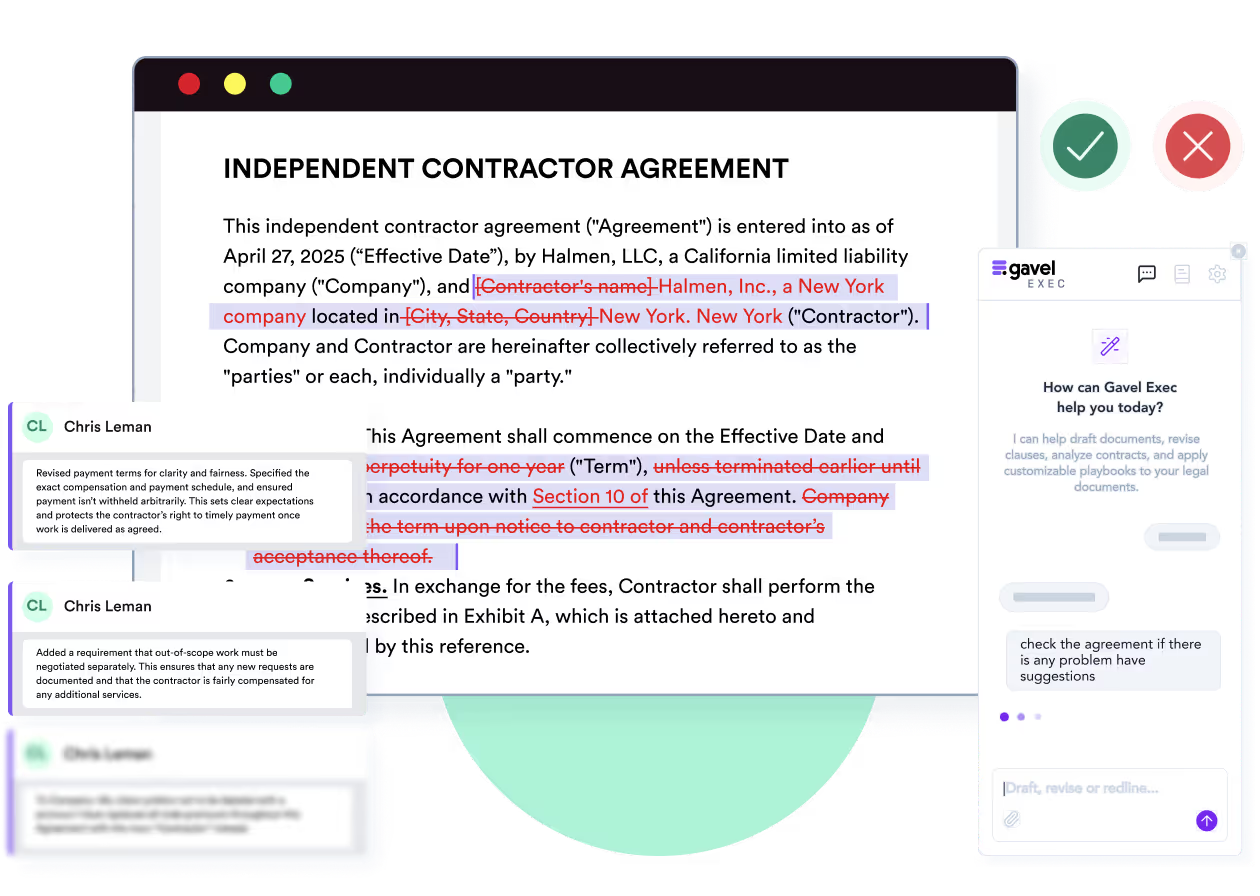
Gavel Exec works inside the agreement you are negotiating. It applies your playbooks and precedent and returns priority-ranked redlines as tracked changes, margin comments and a list of missing terms. You accept or reject each change in Word and can ask Exec to draft or redraft a clause in the same pane.
You are in-house counsel at the customer. The vendor’s draft says it will notify you of a security incident “without undue delay”. Your illustrative playbook requires written notice within 72 hours of discovery, with a description of the data affected. The expected redline replaces “without undue delay” with “within seventy-two (72) hours of discovery” and adds the description requirement, with a comment explaining the position. You decide whether to accept, edit or reject it, and check that the definition of security incident still matches. Done by hand, this is a clause-by-clause read against your checklist. Both vendors document this playbook-to-redline workflow; this is an evaluation scenario, not a test either product ran.
Yes. DocJuris in Word adds a side pane where you ask questions about the open document, request edits that land as tracked changes, and run Custom Actions: one-click team workflows that DocJuris’s legal engineers build after you describe them. It connects to your organization’s DocJuris instance, and IT deploys it through the Microsoft 365 admin center. DocJuris positions its browser platform for bulk review, intake and playbook management.
Gavel Exec needs only an account at exec.gavel.io; the web app works without a download. To redline a specific document, add the Exec add-in from Microsoft AppSource. If your organization manages Microsoft 365 centrally, an admin may need to enable it.
Yes. DocJuris in Word runs in Word for Microsoft 365 on Windows and Mac and in Word on the web, and IT deploys it through the Microsoft 365 admin center for your organization’s DocJuris instance. Gavel Exec runs in Word for Windows, Word for Mac (2016 or later) and Word on the web, plus a browser app you can sign up for yourself.
DocJuris doesn’t list a price. Its pricing page says it isn’t priced per seat, per document or per question. Most customers take an annual platform subscription sized to contract volume, the apps they enable and the integrations they need, with unlimited users. The alternative is a one-time build fee for a single app, shipped in weeks, followed by hosting and AI usage credits. DocJuris says it is priced so a 20-to-40-lawyer department can buy it, includes concierge onboarding with no services invoice, and promises a custom proposal after a 30-minute demo, with 20% off the first scope of work if you engage within 30 days.
Gavel Exec costs $160 per user per month, or $1,740 per user per year billed annually, with 1,000 queries per user per month, month to month with no long-term contract, and team pricing for 10 or more seats. Every user starts with 25 free queries and no credit card.
Which costs less depends on who needs access. For a few lawyers who negotiate contracts, Exec’s published per-seat price is easy to budget and to test before you buy. For a department that wants procurement, sales and legal staff all working in one tool, DocJuris’s unlimited-user platform fee may cost less per person; you’ll only know after its scoping call.
DocJuris does not publish prices; it is quote-based. It sells an annual platform fee sized to your contract volume, apps and integrations, with unlimited users, or a one-time build fee plus hosting and AI usage credits for a single app, and it quotes after a 30-minute demo. Gavel Exec publishes a per-seat price.
DocJuris does not publish a trial of its platform; the route is a demo and a custom proposal. Two tools are free: the Contract Email Agent, which returns a redline and summary for a contract you email, without signing up, and Horizon, a daily legal news brief. Gavel Exec starts with 25 free queries per user and no credit card.
DocJuris is SOC 2 Type II certified. Its security and administration page describes a single-tenant deployment with its own data boundary, single sign-on through your identity provider, invite-only access when single sign-on is off, and audit logs for logins and permission changes. For the free email agent, DocJuris says your data is deleted once processed.
Gavel Exec is SOC 2 Type II certified, and Gavel has Zero Data Retention agreements with the AI model providers it uses, including OpenAI. Each customer gets its own subdomain, isolated database and separate file storage, hosted in the United States by default with EU, Canada and Australia options.
No, according to DocJuris: it says your data never trains AI models. It is SOC 2 Type II certified and runs each customer in a single-tenant deployment with single sign-on and audit logs.
No. Gavel doesn’t use customer data, prompts or documents to train AI models, and it has Zero Data Retention agreements with its AI providers. Gavel Exec is SOC 2 Type II certified.
DocJuris, Inc. was founded in 2018 and is based in Houston, Texas. It started as a contract negotiation tool and in July 2026 launched Workforce, a catalog of more than 25 apps for in-house legal, procurement and sales teams, from vendor screening and repository tracking to eBilling and legal research. Its homepage lists customers including Dell, FedEx, Spotify and Ancestry. Gavel is part of Relativity, a legal data intelligence company; Gavel Exec is built for negotiating and drafting contracts in Word.
DocJuris, Inc. is an independent company based in Houston, Texas, founded in 2018 by Henal Patel (CEO) and Brian Ng (CTO). It raised an $8 million Series A led by Silverton Partners in October 2024, according to its press release; we found no acquisition.
Method: Gavel editorial review. Checked against DocJuris’s and Gavel’s public pages on November 14, 2026. Gavel publishes this comparison and sells Exec; Gavel has been part of Relativity since June 12, 2026. No hands-on comparative test of the two products was conducted. Corrections: contact Gavel.
It’s the best system I’ve tried, and I’ve tried many. I’ve found Gavel Exec really good to work with and responsive to how I negotiate, how I redline.
Martin Algie, Principal at MIA Contract Lawyers
Pick an agreement you have already negotiated, so you know its issues. Start from a built-in Exec playbook or generate rules from your checklist, run it in Word and compare the redlines with your own markup. To see DocJuris on the same contract without a sales call, send it to DocJuris’s free Contract Email Agent and compare what each flags, what you reject and how long checking takes.
Start with 25 free queries and no credit card. If DocJuris already covers how you negotiate, another seat may add little. If what you need is one platform where procurement and sales send in contracts and legal tracks the work, DocJuris is built for that.
You can start without a demo or proposal: run a built-in playbook or your own rules on third-party paper in Word and review each tracked change. 25 free queries per user, no credit card.
This comparison uses publicly available product, pricing, and review information. Features, pricing, and access terms may change, so buyers should verify current details directly with each vendor.
Test Exec’s playbook review on a contract on your desk today, on Windows, Mac or the web. 25 free queries, no credit card.


