Document Automation
Product features
By practice area
By company size
Contract Review
PRODUCT FEATURES
Resources
LearN
Case Studies
Pricing
LawVu runs intake, matters, contracts and spend for in-house legal teams, and adds LawVu Draft in Word. Gavel Exec helps lawyers review, redline and draft in Word. Here’s which one fits.

Choose LawVu if your in-house team wants one system for legal requests, matters, contracts and outside-counsel spend, with LawVu Draft adding templates, clause libraries and playbook review in Word, and you’re ready for a sales-led rollout. Choose Gavel Exec if your lawyers mainly need AI contract review and redlining in Word, want to start today on their own, and want market benchmarking alongside their playbooks: it starts with 25 free queries and no credit card, then costs $160 per user per month.
This comparison covers LawVu LegalOS and LawVu Draft, the Word add-in LawVu took over when it acquired ClauseBase in December 2025, as sold on November 14, 2026.
LawVu
LawVu is a legal operating system for in-house legal teams, headquartered in Tauranga, New Zealand. LegalOS combines intake and triage, matter management, contract management, spend management and e-billing, documents and reporting, with LawVu Assistant, AI agents and LawVu Lens for analysing executed contracts. LawVu Draft, formerly ClauseBase, is its Word add-in for drafting from templates and clause libraries and reviewing contracts against playbooks; LawVu lists Addleshaw Goddard, CMS and Deloitte Legal among its customers.
Gavel Exec
Gavel Exec is AI contract review, redlining, and drafting software for legal teams. It works in Microsoft Word and online, so attorneys can review contracts inside Word or use browser-based workflows for broader contract analysis.
Gavel Exec supports playbook-based review, redlining, drafting, benchmarking, batch analysis, and multi-document comparison. Playbooks can be generated with AI, built from uploaded files, created manually, or started from built-in playbooks created by practicing attorneys. Gavel Exec publishes pricing at $160 per user per month or $1,740 per user annually, and offers 25 free queries per user with no credit card required.
If your team runs matters and contracts in LawVu LegalOS, keep doing so. The choice is for the Word step, where Gavel Exec redlines the agreement as priority-ranked tracked changes with the reasoning for each. If you already pay for LawVu Draft, it covers templates, clause libraries and playbook review, so another seat may add little unless your lawyers want market benchmarking or playbooks generated from signed agreements and spreadsheets. If you have LegalOS without the Draft add-on, Gavel Exec is the self-serve alternative: try it on a live contract before you buy the add-on. A playbook kept as a Word document works as a source in both. LawVu’s separate add-in for Word opens and saves documents to and from LawVu, so finished drafts can still go back to the matter. Neither vendor documents running both add-ins together, so test them in your Word setup.
LawVu is a legal operating system for in-house legal teams: intake, matter management, contract management, spend management and e-billing, with AI across the platform, priced by quote. Its Word add-in, LawVu Draft (formerly ClauseBase), drafts from templates and clause libraries and reviews contracts against playbooks; it’s sold standalone or as a paid add-on, from $500 USD per month, with a 14-day trial on request. Gavel Exec is AI contract review, redlining and drafting in Word on Windows, Mac and the web, plus a browser app, with built-in playbooks and market benchmarking. It starts with 25 free queries and no credit card, then costs $160 per user per month. In both, a lawyer decides on every change.
Choose Gavel Exec if your lawyers negotiate contracts in Word and want AI redlines against built-in or their own playbooks, plus market benchmarking, starting today at a published per-seat price. It suits solo, small and mid-sized firms and small in-house teams. If you need a system for legal intake, matters or outside-counsel spend, that is LawVu LegalOS’s job; Gavel Exec covers the negotiating and drafting step in Word and can sit beside it, as set out under “Already on LawVu? Where Gavel Exec fits”.
US public terms checked November 14, 2026. The LawVu column describes LawVu Draft, its Word add-in, unless a cell says LegalOS. LawVu LegalOS is quote-based; LawVu Draft publishes a starting price. Sources: LawVu plans and Gavel Exec pricing.
| Feature | LawVu | Gavel Exec |
|---|---|---|
| Price | LawVu Draft from $500 USD/month, priced by users on a license. LegalOS: not published; quote-based, plus a year-one onboarding fee. | $160/user/month or $1,740/user/year; 1,000 queries per user per month; team pricing for 10+ seats. |
| Billing | Not published; terms are agreed in your LawVu contract. | Monthly or annual plan; annual price is billed annually. |
| Free Trial | 14-day LawVu Draft trial on request; no LegalOS trial listed; demo available. | 25 free queries per user; no credit card required. |
| AI Features | LawVu Draft: templates, clause library, playbook review, AI redlining, Q&A, document comparison. LegalOS: Assistant, AI intake, Lens contract analysis. | Review, priority-ranked redlines, drafting, playbooks, market benchmarking and browser analysis. |
| Playbooks | Rules written by hand, generated from selected text, from sample playbooks or from a Word document’s headings. | Built-in playbooks; rules from .docx, PDF or CSV; manual editing, sharing and import/export. |
| Word Integration | LawVu Draft add-in: Windows (Microsoft 365 or WebView2), Mac (Microsoft 365), web; browser app at draft.lawvu.com. | Word add-in for Windows, Mac (2016+), Word on the web and Microsoft 365, plus a web app at exec.gavel.io. |
| Support | 24/7 support, onboarding and training; help center and a Customer Success Manager. | Exec help center and phone support 7 days a week; demo for security and vendor questions. |
Ratings as listed on G2, November 2026: LawVu shows 4.5 out of 5, with G2’s listings giving between 93 and 101 reviews. Reviewers praise implementation and support; one reviewer noted it doesn’t yet integrate with shared inboxes. As listed on Gartner Peer Insights, November 2026, LawVu Legal Workspace shows 3.6 out of 5 from 6 ratings. These ratings cover LawVu’s whole platform, not LawVu Draft alone.
Watch Gavel’s 71-second Exec walkthrough to see a Series A stock investment agreement redlined against an attached term sheet, then a vendor-agreement playbook run with accepted edits appearing as tracked changes. LawVu’s own LawVu Draft demo shows drafting from a question-driven template, playbook review against preferred and fallback positions, AI redlining and a summary of counterparty changes; its page doesn’t give a recording date. Vendor demonstrations show how a product operates, not how well it compares.
[0:01] Meet Gavel Exec, the data-driven AI tool for contract redlining and drafting. Built by lawyers right inside Microsoft Word, ask Exec to negotiate your contract to standard market terms or to your preference.
[0:15] Negotiate the agreement and ensure the terms match the attached term sheet. Exec analyzes the contract, any relevant documents from your source database, and drafts suggested language with clear explanations.
[0:31] With Playbooks, lock in your negotiation positions as rules that use your precedent and reliable market benchmarks. Understand gaps with one click and immediately apply changes.
[0:45] Exec draws on thousands of real-world negotiation patterns to give you market-aligned language. And it’s continuously learning from you and your team’s preferences with a collaborative platform.
[0:59] Drive better outcomes with concrete data and reliable issue spotting. Supercharge your contract analysis. Start a free trial of Gavel Exec today.
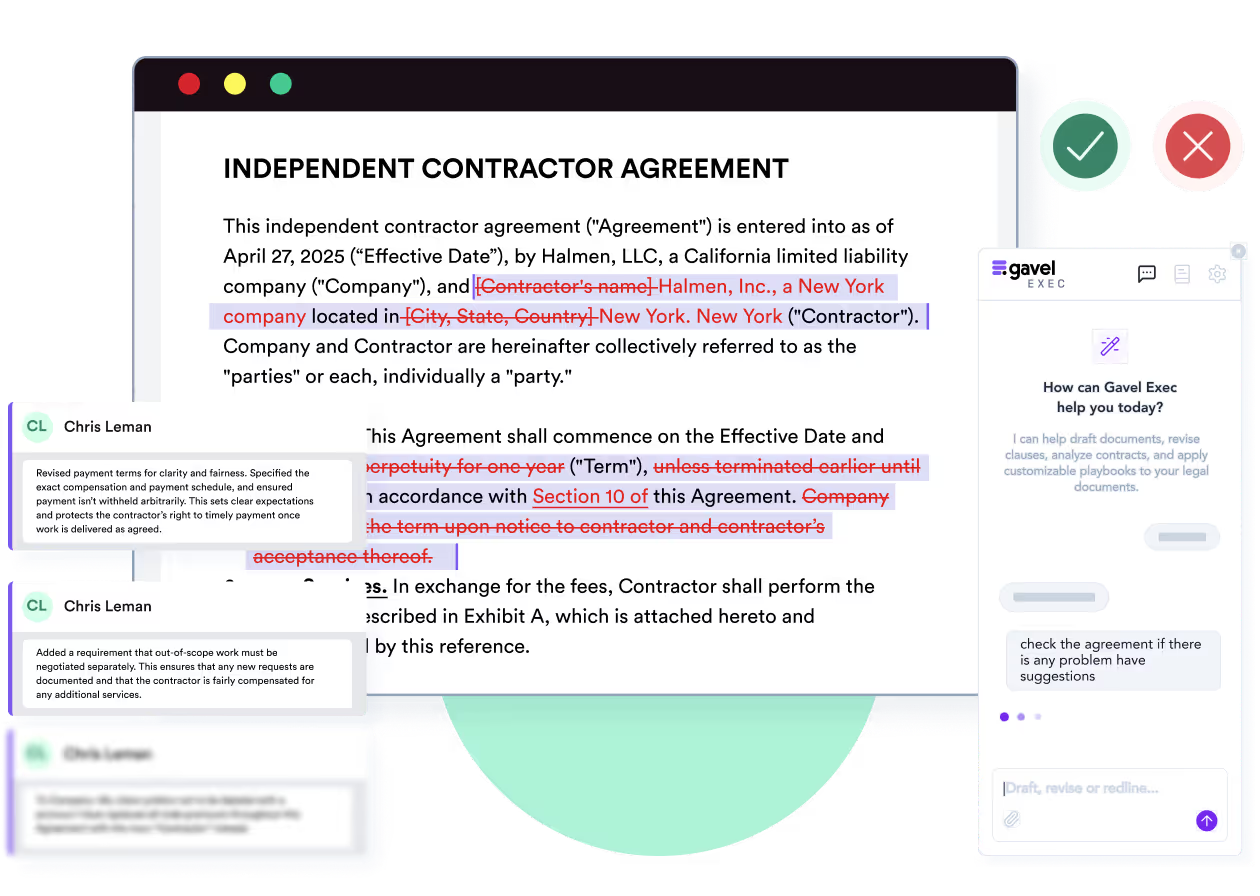
Yes. LawVu Draft sits in Word and reviews a contract against your playbook’s preferred and fallback positions, showing where it aligns or diverges. You can redline with AI help, insert approved clauses from your clause library with one click, and blend the counterparty’s wording with your own. Playbook results come back as structured feedback with references to the relevant sections, and rules can insert a comment or rewrite selected text. LawVu Draft also summarises a counterparty’s tracked changes, compares documents and flags broken cross-references and missing definitions.
Gavel Exec redlines the whole agreement in Word as priority-ranked tracked changes and comments, based on your playbooks and precedent, with the reasoning behind each change. You accept or reject each one in Word, as with a colleague’s markup.
Where LawVu Draft goes further is drafting from your own material: question-driven templates, a shared clause and precedent library, and self-service document generation. Gavel Exec drafts from a blank page, fills a template or rewrites a clause from a prompt. LawVu tells users not to rely on AI review output alone, and the same applies to Gavel Exec: a lawyer checks every suggested change.
You’re in-house counsel at the customer. The vendor’s draft renews automatically for successive 12-month terms unless you give 90 days’ notice, and lets the vendor raise fees by any amount at renewal. Your illustrative playbook calls for 30 days’ notice and a 5% cap on renewal increases. The expected redline replaces “ninety (90) days” with “thirty (30) days”, adds the cap, and comments on why. You decide whether to accept, edit or reject each change, and add the renewal date to your tracker. Done by hand, this is a clause-by-clause read against your checklist. Both vendors document this rule-to-redline workflow; this is an evaluation scenario, not a test either product ran.
Gavel Exec’s benchmarking compares each provision with market terms for the jurisdiction, industry and company size you choose, marks it on-market, off-market or missing, and suggests alternative language. It accepts PDF, .docx and .txt files. LawVu Draft measures a contract against your own playbook, approved clauses and precedents, and LawVu Lens turns your executed contracts into searchable data on obligations and risk; LawVu doesn’t describe benchmarking clauses against outside market data. Either way, a lawyer decides whether a market position suits the deal.
LawVu Draft installs from Microsoft AppSource; search for “LawVu” in Word’s add-ins store, or your admin can deploy it from the Microsoft 365 admin center. LawVu’s install guide lists Microsoft 365 (recommended) or a Word version that supports WebView2 on Windows, and Microsoft 365 on Mac, plus a browser version at draft.lawvu.com. It works with .docx files, not the older .doc format. LawVu’s quick start guide notes your IT team may need to help with the install.
Gavel Exec needs an account at exec.gavel.io; the web app works without a download. To redline a specific document, add the Word add-in from Microsoft AppSource. It runs in Word for Windows, Word for Mac (2016 or later), Word on the web and Microsoft 365; if IT manages Microsoft 365 centrally, an admin may need to enable it.
Languages: LawVu doesn’t list supported contract languages on the pages checked, though a Belgian law firm customer credits LawVu Draft with multilingual support. Gavel Exec lets you set the country and state or province for drafting and review, and asks teams working with contracts in another language to talk to Gavel first.
Yes. LawVu says LawVu Draft supports Word for Windows, Mac and the web. Its install guide lists Microsoft 365 on Mac, and Microsoft 365 or a WebView2-capable Word (usually newer than Word 2019) on Windows, plus a browser version at draft.lawvu.com. Gavel Exec runs in Word for Windows, Mac (2016 or later), Word on the web and Microsoft 365, plus a web app.
Yes. LawVu’s plans page says LawVu Draft is available standalone or as an add-on to its LegalOS plans, and LawVu Draft is sold to law firms as well as in-house teams. Gavel Exec is sold on its own, per seat.
Gavel Exec costs $160 per user per month, month to month with no long-term contract, or $1,740 per user per year. Paid plans include 1,000 queries per user per month, and each user starts with 25 free queries, no credit card and no sales call. Teams of 10 or more seats get team pricing.
LawVu Draft’s pricing page says pricing starts from $500 USD per month and depends on the number of users on a license; LawVu gives the exact figure after a demo. LawVu LegalOS comes in three plans (Matters, Essentials and Ultimate), priced on the modules you choose plus the number of users, and LawVu Draft is an optional add-on on each. Each LegalOS plan includes a standard onboarding fee in year one. LawVu says it doesn’t charge a percentage of your legal spend.
LawVu LegalOS pricing is not published; it’s quote-based, set by the modules you choose and the number of users, with a standard onboarding fee in year one. LawVu Draft pricing starts from $500 USD per month, set by the number of users on a license. Gavel Exec publishes a per-seat price.
Yes. LawVu offers a free 14-day trial of LawVu Draft on request. Gavel Exec starts with 25 free queries per user that you can use right away, with no credit card.
LawVu’s trust center says it is certified to ISO/IEC 27001 and audited against SOC 1 and SOC 2 Type II, and LawVu’s AI product page says it is certified for ISO 42001, the standard for AI management systems, while its AI security FAQ says it is aligned with ISO 42001 and working toward certification. It is hosted on Microsoft Azure, lets you choose a data region (Australia, Canada, Europe, the United Arab Emirates or the United States) and encrypts data at rest with AES-256.
Gavel Exec is SOC 2 Type II certified and has Zero Data Retention agreements with the AI model providers it uses, including OpenAI. Data is encrypted at rest with AES-256 and hosted on AWS in the United States by default, with European Union, Canada and Australia regions available. See Gavel security.
No. LawVu says it does not use your data or your prompts to train its models, and that its AI features run in its Microsoft Azure environment, with data at rest in the region you choose. Its AI security FAQ says several AI features run on Azure OpenAI models through Microsoft Azure AI Foundry, and that certain AI products may process data outside your selected data location to generate outputs.
No. Gavel doesn’t use customer data, prompts or document content to train AI models, and it has Zero Data Retention agreements with the AI providers it uses, including OpenAI.
LawVu is headquartered at 26-28 Wharf Street in Tauranga, New Zealand, and led by chief executive Sam Kidd. It is backed by Insight Partners, Movac and Airtree Ventures. In December 2025 it acquired ClauseBase and launched LawVu Lens. Gavel is part of Relativity, which announced its acquisition of Gavel on June 12, 2026, and also offers e-discovery software.
Yes. LawVu announced its acquisition of ClauseBase, a Belgian contract drafting and review company, on December 17, 2025, and renamed the product LawVu Draft.
LawVu is a privately held company headquartered in Tauranga, New Zealand, and backed by Insight Partners, Movac and Airtree Ventures. Sam Kidd is its chief executive.
Method: Gavel editorial review. Checked against LawVu’s and Gavel’s public pages on November 14, 2026, including lawvudraft.com and LawVu’s help center. Gavel publishes this comparison and sells Exec; Gavel is part of Relativity. No hands-on comparative test of the two products was conducted. Corrections: contact Gavel.
It’s the best system I’ve tried, and I’ve tried many.
Martin Algie, Principal, MIA Contract Lawyers (quoted on gavel.io/exec)
Pick an agreement you have already negotiated, so you know its issues. Start from a built-in Exec playbook or generate rules from your checklist or signed agreements, run it in Word and compare the redlines with your own markup. If you’re trialling LawVu Draft too, run the same agreement through both and compare what each flags, what you reject and how long checking takes.
Start with 25 free queries and no credit card. Exec’s tracked changes and comments stay in the Word document, so the reviewed draft can go back to the matter in LawVu like any other file.
Run a built-in playbook or your own rules on a live agreement in Word and review each tracked change. 25 free queries per user, no credit card.
This comparison uses publicly available product, pricing, and review information. Features, pricing, and access terms may change, so buyers should verify current details directly with each vendor.
See which terms are on-market before you send your markup back. 25 free queries, no credit card.


