Document Automation
Product features
By practice area
By company size
Contract Review
PRODUCT FEATURES
Resources
LearN
Case Studies
Pricing
Lawxy bundles contract review in Word with research, case analysis, intake and on-premise deployment for in-house teams. Gavel Exec redlines contracts in Word against your playbooks. Compare fit, Word support, security and price.

Lawxy and Gavel Exec both review contracts in Microsoft Word, but they are bought differently. Lawxy fits in-house legal teams that want one enterprise platform for contract review, legal research, case analysis, intake and translation, with cloud or on-premise deployment and a quote from sales. Gavel Exec fits lawyers who want playbook redlines as tracked changes in Word on Windows, Mac and the web, starting today: 25 free queries per user, no credit card, then $160 per user per month.
Lawxy
Lawxy (Lawxy AI) is enterprise legal AI software for in-house legal teams, built by the team behind Volody, a contract lifecycle management platform. Its modules include Contract Review Studio and Contract Lens in Microsoft Word, JurisMind legal research, Case Lens case analysis, the Dino Intelligence Room for due diligence, Translex translation, a legal intake desk and AgentFlow AI agents. It runs on AWS or on-premise.
Gavel Exec
Gavel Exec is AI contract review, redlining, and drafting software for legal teams. It works in Microsoft Word and online, so attorneys can review contracts inside Word or use browser-based workflows for broader contract analysis.
Gavel Exec supports playbook-based review, redlining, drafting, benchmarking, batch analysis, and multi-document comparison. Playbooks can be generated with AI, built from uploaded files, created manually, or started from built-in playbooks created by practicing attorneys. Gavel Exec publishes pricing at $160 per user per month or $1,740 per user annually, and offers 25 free queries per user with no credit card required.
Yes. Both run as Microsoft Word add-ins, so a team can keep Lawxy for research, intake or due diligence and use Gavel Exec for contract negotiation in Word; your Microsoft 365 admin decides which add-ins are allowed. Nothing has to move over: Gavel Exec generates playbook rules from the checklists and playbooks you already use.
Lawxy is an enterprise legal AI platform for in-house legal teams, built by the team behind Volody CLM: a Word add-in for contract review plus legal research, case analysis, due diligence, intake and translation, deployable in the cloud or on-premise, with quote-based pricing and no published trial terms. Gavel Exec is AI contract review and drafting in Word for Windows, Mac and the web, with saved playbooks and tracked-change redlines; it starts with 25 free queries and no credit card, then costs $160 per user per month.
Choose Gavel Exec if your lawyers negotiate contracts in Word on Windows, Mac or the web and want saved playbooks applied as tracked changes, with SOC 2 Type II certification, a published per-user price and a free start. Omar Nakadi, Legal Counsel at a regulated financial services firm, estimates 40 to 60% less review time per contract with Gavel Exec. Not for you if you need a native iManage or NetDocuments integration today.
Public terms checked November 14, 2026. Lawxy has no pricing page; it states its quote-based pricing in its own comparison FAQ. Sources: Lawxy’s pricing answer and Gavel Exec pricing.
| Feature | Lawxy | Gavel Exec |
|---|---|---|
| Price | Not published; quote-based. On-premise: no per-user licence fees, price not published. | $160/user/month or $1,740/user/year; 1,000 queries per user per month; team pricing for 10+ seats. |
| Billing | Not published; terms set in your quote and platform agreement. | Month to month with no long-term contract, or an annual per-user plan. |
| Free Trial | Trial terms not published; the site offers “Try Now” buttons and personalized demos. | 25 free queries per user; no credit card required. |
| AI Features | Contract review in Word with AI redlines and fallback language, drafting, legal research, case analysis, due diligence, document Q&A, translation, intake, AI agents. | Full-agreement redlines as tracked changes, comments, missing terms, drafting, playbooks and market benchmarking. |
| Playbooks | Trains on playbooks you upload; review playbooks built by legal experts; clause checks against internal policies. | Built-in playbooks; rules you write or generate from .docx, PDF or .csv; pass/fail per rule; Read-Only or Edit sharing. |
| Word Integration | Microsoft Word add-in; supported Word versions not published. Outlook and Gmail integrations. | Word add-in for Windows, Mac (2016+), Word on the web and Microsoft 365, plus the web app at exec.gavel.io. |
| Support | Support terms not published; personalized demos; US and India phone numbers. | Support 7 days a week by email and phone; one-to-one demos with a product expert. |
Ratings: Lawxy has very few public reviews. As listed on Capterra in November 2026, Lawxy had a 5.0 out of 5 rating from a single review; G2 listed no Lawxy reviews. One review is not enough to judge the product. Testimonials on Lawxy’s Word add-in page mostly describe legal research and litigation drafting.
The Lawxy pages we checked don’t embed a product walkthrough video; it offers personalized demos and links to a YouTube channel. Watch Gavel’s 71-second Exec walkthrough: a stock investment agreement edited against an attached term sheet, then a vendor-agreement playbook review with accepted edits appearing as tracked changes. Vendor demos show how a product works, not how well it works compared with another.
[0:01] Meet Gavel Exec, the data-driven AI tool for contract redlining and drafting. Built by lawyers right inside Microsoft Word, ask Exec to negotiate your contract to standard market terms or to your preference.
[0:15] Negotiate the agreement and ensure the terms match the attached term sheet. Exec analyzes the contract, any relevant documents from your source database, and drafts suggested language with clear explanations.
[0:31] With Playbooks, lock in your negotiation positions as rules that use your precedent and reliable market benchmarks. Understand gaps with one click and immediately apply changes.
[0:45] Exec draws on thousands of real-world negotiation patterns to give you market-aligned language. And it’s continuously learning from you and your team’s preferences with a collaborative platform.
[0:59] Drive better outcomes with concrete data and reliable issue spotting. Supercharge your contract analysis. Start a free trial of Gavel Exec today.
Lawxy is a legal AI platform for in-house legal teams that puts many legal jobs in one workspace: contract review and drafting in Microsoft Word, citation-backed legal research, case analysis, due diligence across large document sets, document comparison, document Q&A, legal translation, intake and triage, obligation tracking and regulatory scanning. Its pages also name law firms, litigation practices and paralegals as users, and its research covers Indian and global law.
Gavel Exec does one of those jobs: contract review, redlining and drafting for transactional lawyers in Word. If your team wants a single vendor for research, litigation preparation and intake as well, Lawxy covers more ground. If the job is negotiating contracts against your positions, compare the two on how review works in Word.
Lawxy AI comes from the team behind Volody, a contract lifecycle management platform based in Mumbai; its founder’s letter is signed by Praket Sharma, who built Volody before Lawxy. Lawxy’s product footer links to Volody for contract management, litigation management, tender management and e-signature. Lawxy lists US and Indian phone numbers and doesn’t publish funding.
Lawxy reviews contracts in Word through Contract Review Studio and Contract Lens. Its Word add-in page describes clause-level suggestions, alternative language and risk signals inside the document, checks against your approved playbooks and internal policies, questions answered from the contract, and automatic summaries of obligations and key dates. Lawxy says it can be trained on your review checklist and preferred language.
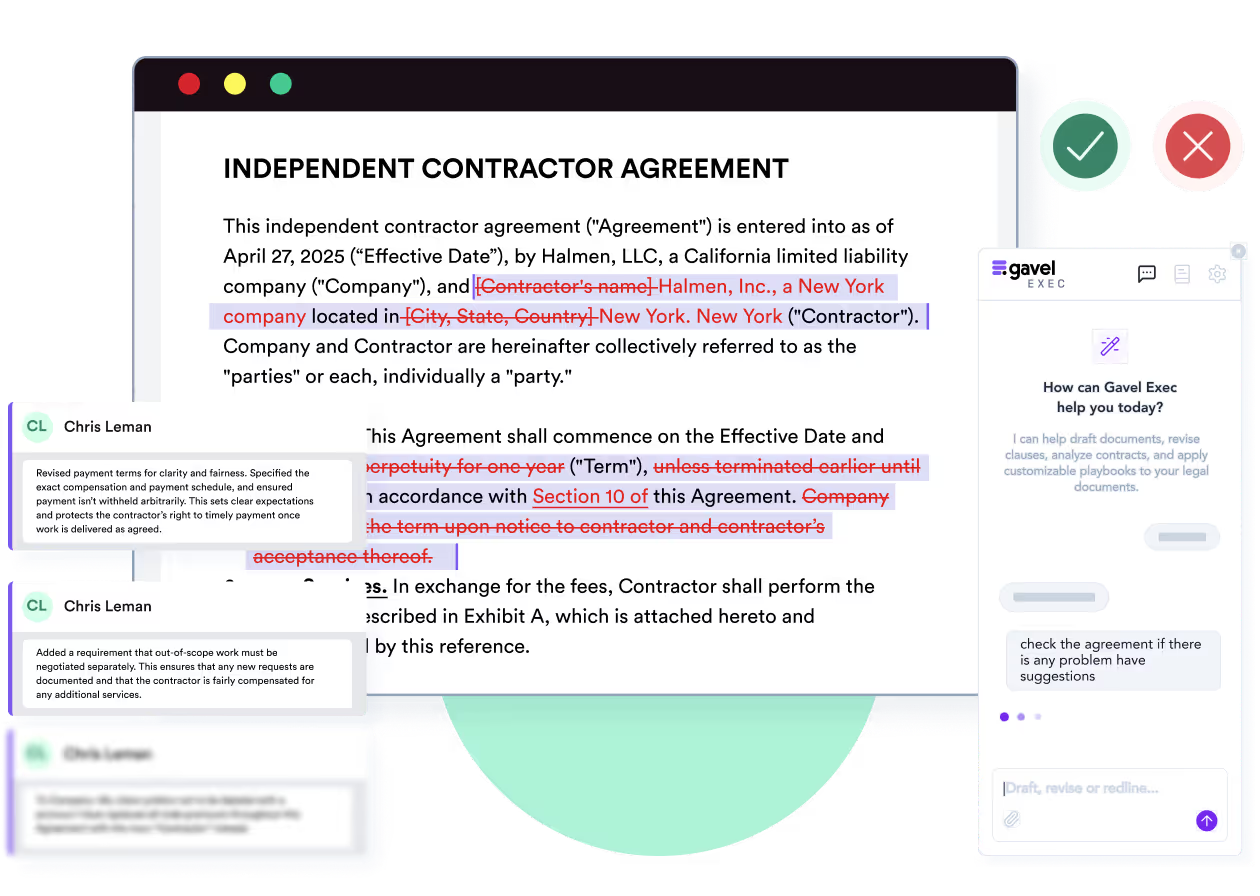
Gavel Exec reviews the whole agreement inside the Word document. Run a built-in playbook or your own: each rule passes or fails, failed rules show a reason and a proposed change, and Apply All inserts the suggestions as tracked changes, ready to send back to the other side.
Yes. Lawxy offers a Microsoft Word add-in for contract review, drafting and clause analysis, plus Outlook and Gmail integrations. Lawxy doesn’t publish which Word versions or platforms the add-in supports. Gavel Exec runs in Word for Windows, Mac (2016 or later), Word on the web and Microsoft 365.
You represent the customer. The supplier’s draft caps its liability at one month of fees; your playbook calls for twelve months. The expected redline replaces “one month of fees” with “twelve months of fees” and flags whether data-protection breaches sit outside the cap. You decide whether to accept, edit or reject it before the draft goes back. Done by hand, this is a clause-by-clause read against your checklist. In Gavel Exec, it shows as a failed rule with a reason and a tracked change in Word. This is an evaluation scenario, not a test we ran on either product.
If your legal team wants one platform beyond contracts, Lawxy covers work Gavel Exec doesn’t. JurisMind gives citation-backed research with relevant case law, Case Lens maps judgments and builds case reports, the Dino Intelligence Room flags risk across due-diligence document sets, and the intake desk triages legal requests from the business. Lawxy says its data covers more than 120 jurisdictions, courts and regulators.
No. Gavel Exec is built for transactional attorneys who review, negotiate and draft contracts, and Gavel says it is not a litigation or e-discovery tool. Relativity, Gavel’s parent company, offers e-discovery software and litigation support.
Gavel Exec costs $160 per user per month or $1,740 per user per year, with 1,000 queries per user per month, after 25 free queries per user and no credit card. Teams of 10 or more get discounted pricing.
Lawxy doesn’t publish prices. Its own comparison FAQ says it uses custom, quote-based pricing, and argues that teams replacing several tools may spend less overall. For on-premise deployment, Lawxy says there are no per-user licence fees, with a higher upfront cost that it says often pays off over three to five years for larger teams.
Lawxy’s price is not published; it is quote-based. Software directories show conflicting figures, so ask Lawxy for a written quote that names the modules, seats and deployment you need.
Lawxy doesn’t publish trial terms. Its site has “Try Now” buttons and a form to book a personalized demo. Gavel Exec gives each user 25 free queries with no credit card.
Lawxy says it is SOC 2 Type I and Type II, ISO 27001:2022 and GDPR compliant, has HIPAA safeguards, encrypts data with TLS 1.2+ in transit and AES-256 at rest, and runs on AWS with region-specific storage. It says your documents, queries and outputs are never used to train AI models, it has opted out of training with all LLM providers, and data is deleted within 30 days of termination. Details are on Lawxy’s security page.
Gavel Exec is SOC 2 Type II certified, keeps each customer’s data in an isolated database on AWS in the US by default, with EU, Canada and Australia hosting available, and has Zero Data Retention agreements with its AI providers.
Lawxy says it is independently audited and compliant with SOC 2 Type I and Type II, GDPR and ISO 27001:2022. Lawxy says its list of sub-processors is in its Trust Center; ask for the SOC 2 report before uploading client documents. Gavel Exec is SOC 2 Type II certified, verified by a third-party auditor.
Yes. Lawxy offers on-premise deployment inside your own infrastructure, including a fully air-gapped setup. This fits teams whose policies don’t allow client documents in a vendor cloud. Gavel Exec runs on AWS with an isolated database and separate file storage for each customer, in the US by default or in the EU, Canada or Australia.
No. Gavel says it does not use customer data, prompts or document content to train any AI models, and that it has Zero Data Retention agreements with the AI model providers it uses.
Checked against Lawxy’s and Gavel’s public pages on November 14, 2026. Method: editorial review by Richard Poelderl of Lawxy’s website, Word add-in, contract review, security, on-premise and comparison pages, and Gavel’s Exec, pricing and security pages. Gavel publishes this comparison and sells Exec; Gavel has been part of Relativity since June 12, 2026. No hands-on comparative test was conducted. Corrections: contact Gavel.
I’ve found Gavel Exec really good to work with and responsive to how I negotiate, how I redline.
Martin Algie, Principal at MIA Contract Lawyers
Take a contract you have already negotiated and the review checklist you would give Lawxy. Generate Gavel Exec rules from that checklist or a signed agreement, check each rule, then run the playbook on the draft in Word and compare the tracked changes with your own markup. You stay responsible for every negotiating decision.
Start with 25 free queries and no credit card. If you need research, intake and on-premise deployment from one vendor, Lawxy’s demo is the better next step. If neither product fits your jurisdiction or security requirements, resolve that before uploading client documents.
Generate Exec rules from your checklist and review the proposed redlines in Word. Start with 25 free queries; no credit card required.
This comparison uses publicly available product, pricing, and review information. Features, pricing, and access terms may change, so buyers should verify current details directly with each vendor.
Test the playbook workflow on a contract you are negotiating now. 25 free queries, no credit card.


