Document Automation
Product features
By practice area
By company size
Contract Review
PRODUCT FEATURES
Resources
LearN
Case Studies
Pricing
Paxton AI puts case files, legal research and court drafting in one browser workspace. Gavel Exec redlines contracts in Word against your playbooks. Compare fit, Word support, security and price.

Paxton AI and Gavel Exec are built for different legal work. Paxton AI fits litigators who want case files, legal research and court-ready drafts in one workspace, including personal-injury firms that need medical chronologies. Gavel Exec fits lawyers who spend their day negotiating contracts in Word and want playbook redlines as tracked changes: 25 free queries per user, no credit card, then $160 per user per month.
Paxton AI
Paxton AI is a legal AI workspace for litigation teams, from a company that says its team built CoCounsel at Casetext. Paxton documents matter-based case files, research across US federal and state law, drafting of motions, briefs and discovery responses grounded in the record, matter timelines and medical chronologies. It also offers contract drafting and review for corporate lawyers in its chat assistant.
Gavel Exec
Gavel Exec is AI contract review, redlining, and drafting software for legal teams. It works in Microsoft Word and online, so attorneys can review contracts inside Word or use browser-based workflows for broader contract analysis.
Gavel Exec supports playbook-based review, redlining, drafting, benchmarking, batch analysis, and multi-document comparison. Playbooks can be generated with AI, built from uploaded files, created manually, or started from built-in playbooks created by practicing attorneys. Gavel Exec publishes pricing at $160 per user per month or $1,740 per user annually, and offers 25 free queries per user with no credit card required.
Yes. Many firms have both litigators and deal lawyers. Paxton AI runs in the browser for research, case files and court filings; Gavel Exec runs in Word for contract negotiation. Nothing has to move between them: Gavel Exec generates its playbook rules from the checklists and signed agreements you already have.
Paxton AI is a browser workspace for litigation teams: case files, US legal research and drafting of motions and briefs, from $499 per user per month after a 7-day trial that needs a credit card. Gavel Exec is AI contract review for transactional lawyers in Word for Windows, Mac and the web, with saved playbooks and tracked-change redlines; it starts with 25 free queries and no credit card, then costs $160 per user per month. Both leave decisions to a lawyer.
Choose Gavel Exec if you negotiate and draft contracts in Word on Windows, Mac or the web and want the same positions applied every time through saved playbooks, with SOC 2 Type II certified hosting and a free start. Not for you if you mainly handle litigation or e-discovery; Relativity, Gavel’s parent company, offers e-discovery software and litigation support for that work.
US public terms checked November 14, 2026. Paxton AI cells describe the Individual plan unless they say Enterprise; Enterprise pricing isn’t published. Sources: Paxton AI pricing and Gavel Exec pricing.
| Feature | Paxton AI | Gavel Exec |
|---|---|---|
| Price | Individual: $499/user/month or $2,999/user/year. Enterprise: not published; quote-based. | $160/user/month or $1,740/user/year; 1,000 queries per user per month; team pricing for 10+ seats. |
| Billing | Monthly or annual billing chosen at sign-up; purchases non-refundable, cancel effective at end of paid term. | Month-to-month, no long-term commitment; annual plan at $1,740/user/year optional. |
| Free Trial | 7-day free trial; credit card required (temporary authorization hold). | 25 free queries per user; no credit card required. |
| AI Features | Litigation workspace: US legal research and citator, case-file analysis, motion and brief drafting, timelines, medical chronologies; contract review in chat. | Full-agreement redlines as tracked changes, comments, missing terms, drafting, playbooks and market benchmarking. |
| Playbooks | Positions described in a prompt or an attached playbook document; saved Skills for reusable instructions. | Built-in playbooks; rules you write or generate from .docx, PDF or .csv; pass/fail per rule; Read-Only or Edit sharing. |
| Word Integration | Web app; drafts export as .docx. Word and Outlook plugins on Enterprise; Word versions not published. | Word add-in for Windows, Mac (2016+), Word on the web and Microsoft 365, plus the web app at exec.gavel.io. |
| Support | Help center and email; priority support and account manager on Enterprise. | Support 7 days a week by email and phone; one-to-one demos with a product expert. |
Ratings: Paxton AI had no user reviews on G2 or GetApp as listed in November 2026. Lawyerist gives Paxton AI an editorial rating of 4.5 out of 5 based on 0 community ratings; Paxton lists Lawyerist as a partner. Paxton’s own site carries testimonials from lawyers at Shaked Law Firm, Bartosiak Makepeace, ICEYE and Above Lending, mostly about research and drafting.
Paxton AI doesn’t publish a product walkthrough on its pricing or platform pages; it offers booked demos for litigation teams. Watch Gavel’s 71-second Exec walkthrough: a stock investment agreement edited against an attached term sheet, then a vendor-agreement playbook review with accepted edits appearing as tracked changes. Vendor demos show how a product works, not how well it works compared with another.
[0:01] Meet Gavel Exec, the data-driven AI tool for contract redlining and drafting. Built by lawyers right inside Microsoft Word, ask Exec to negotiate your contract to standard market terms or to your preference.
[0:15] Negotiate the agreement and ensure the terms match the attached term sheet. Exec analyzes the contract, any relevant documents from your source database, and drafts suggested language with clear explanations.
[0:31] With Playbooks, lock in your negotiation positions as rules that use your precedent and reliable market benchmarks. Understand gaps with one click and immediately apply changes.
[0:45] Exec draws on thousands of real-world negotiation patterns to give you market-aligned language. And it’s continuously learning from you and your team’s preferences with a collaborative platform.
[0:59] Drive better outcomes with concrete data and reliable issue spotting. Supercharge your contract analysis. Start a free trial of Gavel Exec today.
Paxton AI is a legal AI workspace for litigation teams. Each matter holds its case files, research and drafts: Paxton finds facts, gaps and contradictions across the record, researches US federal and state law against the matter’s jurisdiction, and drafts motions, briefs, discovery responses and deposition outlines with citations you can click through. It also builds matter timelines, medical chronologies and medical billing summaries, features Paxton markets to personal-injury firms.
Paxton AI also markets itself to corporate lawyers for contract drafting, contract review and data-room diligence. Gavel Exec focuses on one of those jobs, contract review and drafting in Word, for transactional lawyers at firms and on in-house teams.
Paxton AI is an independent legal tech company. It says its team built CoCounsel at Casetext, and it raised a $22 million Series A led by Unusual Ventures in January 2025, for $28 million in total funding. Paxton is not a law firm, and it says communications with it are not protected by attorney-client privilege.
Paxton AI reviews contracts in its chat assistant. Its corporate law guide has you attach the counterparty’s draft, state your playbook positions in the prompt or attach a playbook document, and ask for a table of section, counterparty language, issue and suggested redline. You can then ask it to draft a redlined response, edit it in Paxton’s Canvas editor and download it as a .docx file. Saved Skills let a firm write its review instructions once and reuse them.
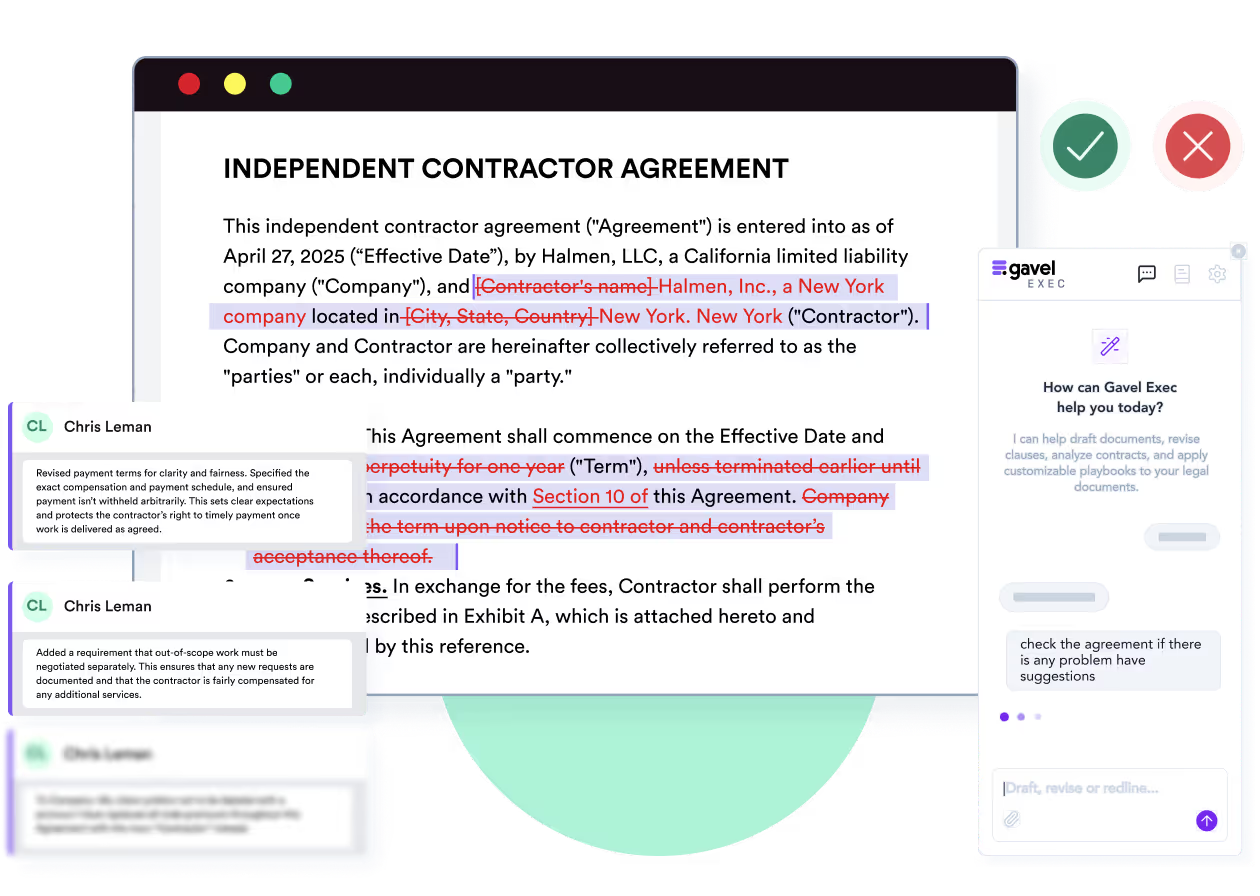
Gavel Exec reviews the contract inside the Word document. Run a built-in playbook or your own: each rule passes or fails, failed rules show a reason and a proposed change, and accepted changes go into the contract as tracked changes and comments, ready to send back to the other side.
Paxton AI lists Word and Outlook plugins on its Enterprise plan but doesn’t publish which Word versions they support or how edits appear. On the Individual plan, Paxton is a web application and exports drafts as .docx files. Gavel Exec redlines inside Word for Windows, Mac and the web on every plan.
You represent the customer. The vendor’s draft renews automatically for another year unless the customer gives notice 10 days before the term ends. Your playbook calls for no automatic renewal without 60 days’ notice. The expected redline replaces “ten (10) days” with “sixty (60) days” and adds a requirement that the vendor send a renewal reminder. Check that the fee-increase and termination clauses still fit. You decide whether to accept, edit or reject it before the draft goes back. Done by hand, this is a clause-by-clause read against your checklist. Paxton AI’s guide shows this kind of review as a table in its assistant; Gavel Exec shows it as a failed rule and a tracked change in Word. This is an evaluation scenario, not a test we ran on either product.
If most of your work is litigation, Paxton AI covers ground Gavel Exec doesn’t. Its research library covers US federal and state statutes, regulations and appellate case law, with an AI citator that checks whether a case is likely still good law. Matters stay current from Box, Dropbox, OneDrive and SharePoint without manual uploads, and the matter timeline cites each date back to its source document. Drafts can follow your firm’s or a court’s formatting template at download.
No. Gavel Exec is built for transactional attorneys who review, negotiate and draft contracts, and Gavel says it is not a litigation or e-discovery tool. Relativity, Gavel’s parent company, offers e-discovery software and litigation support.
Gavel Exec needs a free account at exec.gavel.io and the add-in from Microsoft AppSource; an admin can enable it centrally in the Microsoft 365 admin center. You redline a specific document in the Word add-in; batch analysis and market benchmarking run in the web app. Quick Actions let you set a country and state or province, so review follows that jurisdiction’s conventions. Data is hosted on AWS in the US by default, with EU, Canada and Australia hosting available.
Paxton AI runs in the browser. Individual plans connect Box, Dropbox, OneDrive and SharePoint; Enterprise adds Word and Outlook plugins, iManage and NetDocuments connectors and a Claude integration. Its research library covers US law, so check fit before using it for matters under other countries’ law.
Yes, on its Enterprise plan, which also adds Word and Outlook plugins. Gavel Exec has no native iManage or NetDocuments integration today; Gavel asks firms that need one to talk to it about their setup first.
Gavel Exec costs $160 per user per month or $1,740 per user per year, with 1,000 queries per user per month, after 25 free queries per user and no credit card. Teams of 10 or more get discounted pricing.
Paxton AI’s Individual plan costs $499 per user per month or $2,999 per user per year, chosen at sign-up. Enterprise pricing is custom. Paxton’s help center says purchases are non-refundable; you can cancel any time, effective at the end of the paid term.
Paxton AI’s Individual plan costs $499 per user per month, or $2,999 per user per year billed up front. Enterprise plans, which add Word and Outlook plugins and DMS connectors, are priced by proposal. Older third-party listings with lower prices are out of date.
Yes. Paxton AI offers a 7-day free trial; a credit card is required, and a temporary authorization hold may appear. Your chosen plan starts when the trial ends. Gavel Exec gives each user 25 free queries with no credit card.
Paxton AI says it is SOC 2, ISO 27001 and HIPAA compliant, encrypts data in transit and at rest, and never uses your matters, documents or prompts to train AI models. HIPAA matters if you handle medical records, as personal-injury firms do. Gavel Exec is SOC 2 Type II certified, keeps each customer’s data in an isolated database, and has Zero Data Retention agreements with its AI providers. Gavel security
Paxton AI says it is SOC 2, ISO 27001 and HIPAA compliant, but its security page doesn’t say whether its SOC 2 report is Type I or Type II. Ask Paxton for the report. Gavel Exec is SOC 2 Type II certified, verified by a third-party auditor.
No. Gavel says your documents are not used to train AI models and that it has Zero Data Retention agreements with its AI providers.
Checked against Paxton AI’s and Gavel’s public pages on November 14, 2026. Method: editorial review by Richard Poelderl of Paxton’s website, pricing page, security page, trust site and help center, and Gavel’s Exec, pricing and security pages. Gavel publishes this comparison and sells Exec; Gavel has been part of Relativity since June 12, 2026. No hands-on comparative test was conducted.
I’ve found Gavel Exec really good to work with and responsive to how I negotiate, how I redline.
Martin Algie, Principal at MIA Contract Lawyers
Take a contract you have already negotiated and the checklist you would paste into Paxton AI. Generate Gavel Exec rules from that checklist or a signed agreement, check each rule, then run the playbook on the draft in Word and compare the tracked changes with your own markup. You stay responsible for every negotiating decision.
Start with 25 free queries and no credit card. If your work is mainly litigation and research, Paxton AI’s 7-day trial is the better test. If neither product fits your jurisdiction or security requirements, resolve that before uploading client documents.
Generate Exec rules from your checklist and review the proposed redlines in Word. Start with 25 free queries; no credit card required.
This comparison uses publicly available product, pricing, and review information. Features, pricing, and access terms may change, so buyers should verify current details directly with each vendor.
Test the playbook workflow on a contract you are negotiating now. 25 free queries, no credit card.


