Document Automation
Product features
By practice area
By company size
Contract Review
PRODUCT FEATURES
Resources
LearN
Case Studies
Pricing
Gavel Exec
Gavel Exec is AI contract review and drafting software that runs in Microsoft Word and on the web. It has five core features: contract risk analysis, redlining, playbooks, clause benchmarking and drafting. Each one works on the agreement in front of you and shows the reasoning behind every suggestion.
✓ 2-minute setup • No credit card required
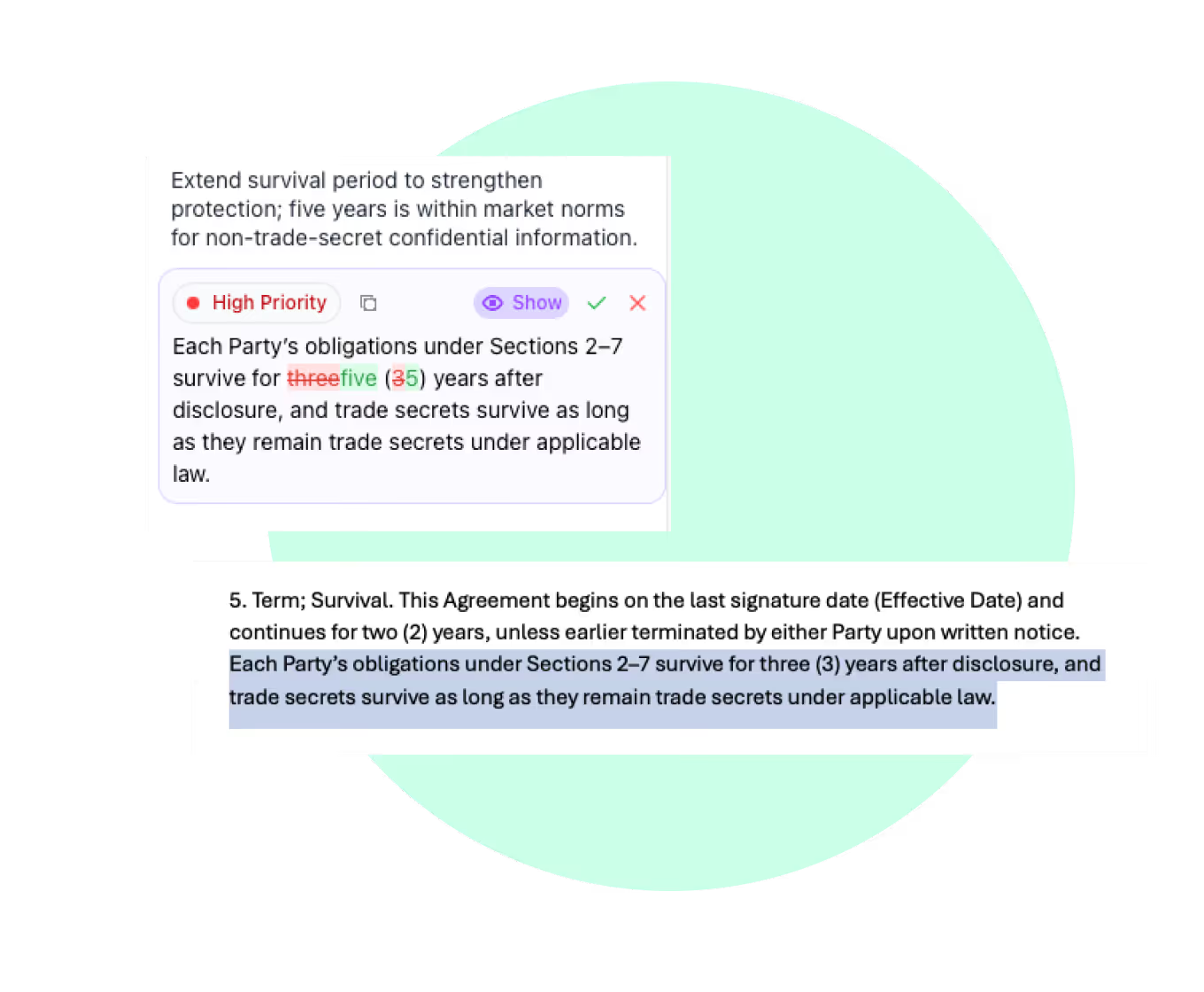





Gavel Exec covers five jobs in a contract matter: finding risk, redlining, checking agreements against your playbook, benchmarking clauses against the market and drafting. Each one runs on the agreement in front of you and shows the reasoning behind what it suggests, so a lawyer can accept, edit or reject every change.
Flags non-standard clauses, missing terms and terms that don't match the letter of intent or term sheet, with the reasoning for each flag. Find Missing Terms compares the agreement with market norms or your sample documents, and Summarize Redlines outlines the other side's changes.
Runs in: Word add-in and web app
Redlines a full agreement as Word tracked changes, ranked by priority, with the reasoning behind each edit. You set the negotiation style from light to aggressive, the party you represent and the jurisdiction.
Runs in: Word add-in
Turns your negotiation positions into rules and checks any agreement against them. Each rule passes or fails, and failed rules come with proposed changes. Generate the rules from checklists or signed agreements.
Runs in: Created in the Word add-in, then available in the web app
Marks each clause on-market, off-market or missing for the jurisdiction, industry and company size you choose, with suggested language. Covers master services agreements, software-as-a-service agreements, nondisclosure agreements, employment agreements, real estate leases and mergers and acquisitions documents.
Runs in: Web app
Drafts full agreements and single clauses from a blank page, your template or your precedent, for the country and state or province you pick. Fill Template completes template placeholders.
Runs in: Word add-in and web app
Start from the task in front of you. The table matches common contract tasks to the feature built for each one.
| Task | Feature | Runs in | What you get |
|---|---|---|---|
| Find the problems in a draft | Contract risk analysis | Word add-in and web app | Flags with reasoning, as a list, redlines or comments |
| Mark up the other side's paper | Contract redlining | Word add-in | Priority-ranked tracked changes, each with its reasoning |
| Hold every agreement to your team's positions | Contract playbooks | Word add-in, then web app | Pass or fail for each rule, with proposed changes |
| Check whether terms are market | Clause benchmarking | Web app | On-market, off-market or missing for each clause, with suggested language |
| Write an agreement or a clause | Contract drafting | Word add-in and web app | Draft text placed where you want it in the document |
| Review dozens of contracts at once | Batch Analysis | Web app | A table of terms from each contract, linked to the source language and exportable as a spreadsheet, plus a drafted memo |
On a negotiation, the features run in sequence. A lawyer reviewing the other side's first draft might:
Gavel Exec runs in two places. The Word add-in installs from Microsoft Marketplace and runs in Word for Windows, Word for Mac (2016 or later), Word on the web and Microsoft 365. The web app at exec.gavel.io handles work across many documents.
| Feature | Word add-in | Web app |
|---|---|---|
| Contract risk analysis | Chat and Quick Actions | Chat, Projects and Batch Analysis |
| Contract redlining | Redline Document and Add Comments | Use the Word add-in to redline a document |
| Contract playbooks | Create, run and share playbooks | Run playbooks created in Word |
| Clause benchmarking | Redline with the market negotiation style | Market Benchmarking |
| Contract drafting | Generate Draft and Fill Template | Long-form drafting |
Two Gavel Exec customers have published their numbers:
“It’s like having another assistant with you who hears your voice, understands what you want, and gives you whatever you need in seconds.”
“It’s the best system I’ve tried, and I’ve tried many. I’ve found Gavel Exec really good to work with and responsive to how I negotiate, how I redline.”
Gavel Exec is SOC 2 (System and Organization Controls 2) Type II certified. Gavel has Zero Data Retention agreements with the AI model providers it uses, including OpenAI, and does not use customer data, prompts or documents to train AI models. Details are on the Gavel security page.
Over 2,000 legal organizations in 28 countries use Gavel, which is part of Relativity.
Each user starts with 25 free queries, with no credit card. Paid plans cost $160 per user per month, or $1,740 per user per year, and include 1,000 queries per user per month. Teams of 10 or more seats get discounted pricing. One playbook run or one drafted document counts as one query. See Gavel Exec pricing, start free or request a demo.
Gavel Exec is AI contract review and drafting software that runs in Microsoft Word and on the web. It is made by Gavel, which is part of Relativity.
Yes. The add-in runs in Word for Windows, Word for Mac (2016 or later), Word on the web and Microsoft 365. Market Benchmarking and Batch Analysis run in the web app.
Redlining a specific document and creating playbooks need the Word add-in. Playbooks you create in Word are then available in the web app.
Each user gets 25 free queries, and paid plans include 1,000 queries per user per month. One playbook run counts as one query no matter how many rules it has, and drafting one document counts as one query.
No. Gavel does not use customer data, prompts or documents to train AI models, and its Zero Data Retention agreements mean its AI providers don't keep your data.
Transactional lawyers in law firms, in-house legal teams and solo practices. Over 2,000 legal organizations in 28 countries use Gavel.
Last updated October 29, 2026.
✓ 2-minute setup • No credit card required
.avif)


